llama.cpp -ngl Flag Explained: 5 Fixes When It Stays on CPU
Set -ngl 99 in llama-cli and the GPU still sits idle? The flag isn't the bug. What -ngl (--n-gpu-layers) does, the 30-second load-log check, and the 5 real causes ranked by how often they bite.
TL;DR
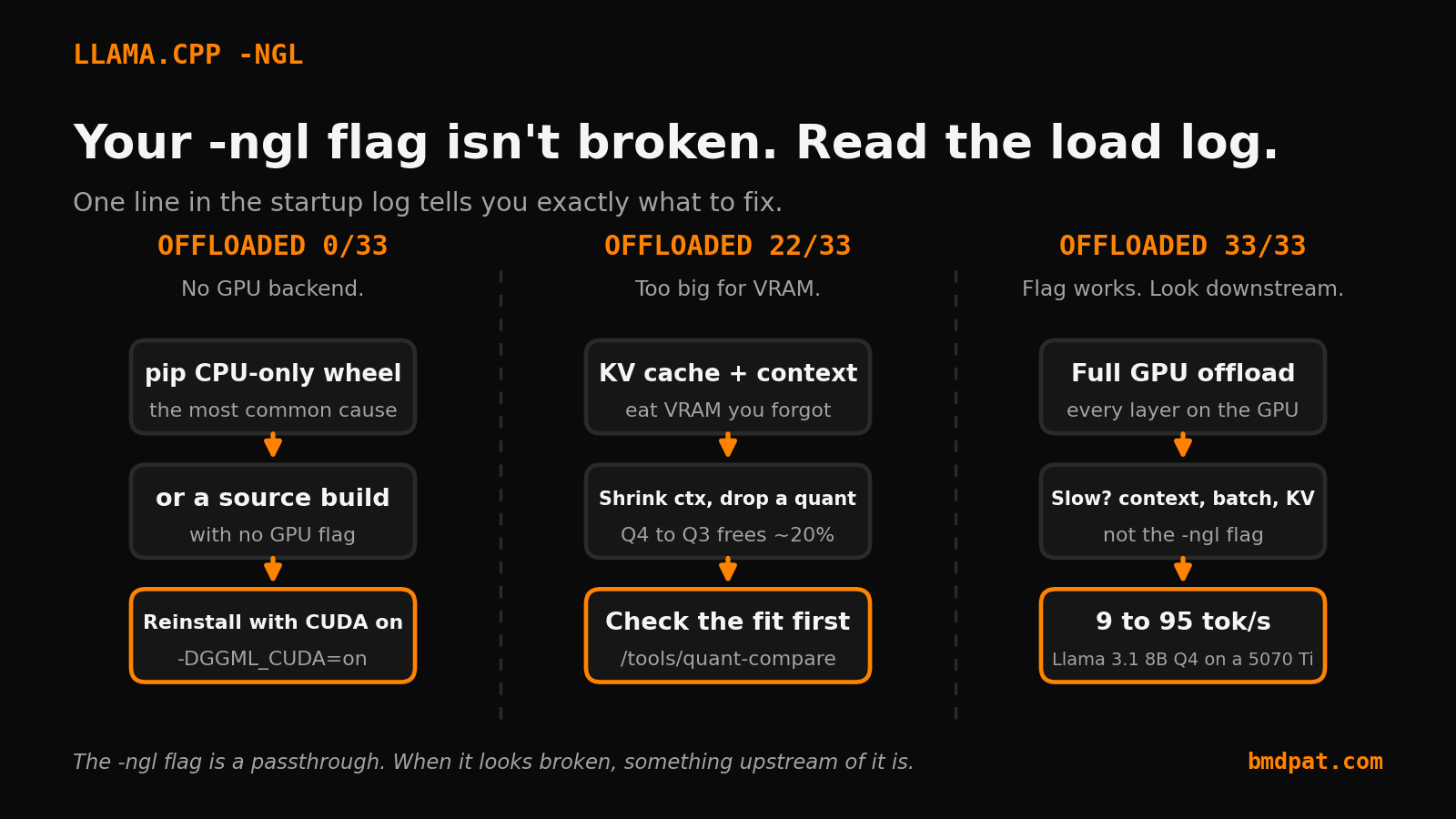
- After requesting full offload with -ngl 99, the load log line 'offloaded N/M layers to GPU' is the 30-second diagnostic. 0/M means no GPU backend compiled in, a partial count means VRAM ran out, M/M means the flag works and the problem is downstream.
- The most common cause by far: pip installs a CPU-only llama-cpp-python wheel by default. Reinstall with CMAKE_ARGS="-DGGML_CUDA=on" or use the prebuilt CUDA wheel index.
- -ngl is still accepted and silently ignored on a CPU-only build. The flag is almost never the bug.
Choose your GPU, system RAM and model. Get a quant and a llama.cpp launch line for one GPU, on-page and by email.
Get my Rig Fit Report for $12One payment. No account. No install to buy your report.
You passed -ngl 99. You expected the GPU to light up. Instead llama.cpp generates at 9 tokens per second and your fans stay quiet. The flag did nothing.
I have hit this on every machine in my rig: a 3070, a 5070 Ti, and a 5090, all serving Llama 3.1 8B through llama.cpp. The ngl flag is almost never the problem. The build you are running, the wheel pip installed, or the VRAM you do not actually have is the problem. Here is how to find out which, in about 30 seconds, then the five real causes ranked by how often they bite.
If you do not yet know what the flag controls, read the companion post first: llama.cpp n-gpu-layers explained. This post assumes you know what -ngl is supposed to do and want to know why it is not doing it.
The 30-second diagnostic: read the load log
Stop guessing. llama.cpp tells you exactly what it offloaded. When the model loads, look for this line:
load_tensors: offloaded 33/33 layers to GPU
That is the entire diagnosis. Two numbers:
33/33means every layer is on the GPU. If you are still slow, your problem is downstream (context, sampling, a CPU-bound KV cache).0/33means nothing offloaded. Your-nglflag was accepted and ignored. This is a build problem.22/33means partial offload. The model did not fit. This is a VRAM problem.
Everything below is just "which of those three did you get, and what to do about it."
Cause 1: pip installed a CPU-only wheel (the most common by far)
This one cost me the most time. pip install llama-cpp-python ships a CPU-only wheel by default. No CUDA. The -ngl argument is still accepted, parsed, and then silently does nothing because there is no GPU backend compiled in. You get offloaded 0/33.
The fix is to reinstall with the CUDA backend turned on:
CMAKE_ARGS="-DGGML_CUDA=on" pip install llama-cpp-python --force-reinstall --no-cache-dir
On Windows PowerShell:
$env:CMAKE_ARGS="-DGGML_CUDA=on"
pip install llama-cpp-python --force-reinstall --no-cache-dir
If you do not have the CUDA toolkit set up for a source build, use the prebuilt wheel index instead:
pip install llama-cpp-python --extra-index-url https://abetlen.github.io/llama-cpp-python/whl/cu124
After reinstall, the load log on my 5070 Ti went from offloaded 0/33 at 9 tokens per second to offloaded 33/33 at 95 tokens per second on Llama 3.1 8B Q4_K_M. Same flag. Same model. The only thing that changed was the backend.
Cause 2: you built llama.cpp from source without a GPU flag
Same failure, raw binary version. If you cloned the repo and ran cmake -B build with no backend flag, you built CPU-only. -ngl is ignored.
Rebuild with the backend for your hardware:
# NVIDIA
cmake -B build -DGGML_CUDA=ON && cmake --build build --config Release

# Apple Silicon
cmake -B build -DGGML_METAL=ON && cmake --build build --config Release

# AMD (ROCm)
cmake -B build -DGGML_HIPBLAS=ON && cmake --build build --config Release
Confirm it took: ./llama-cli --version should print your backend, and the startup banner lists the GPU device. If it says CPU only, the build flag did not apply.
Cause 3: the model does not fit, so llama.cpp offloads what it can
You set -ngl 99 but the load log says offloaded 22/33. The flag worked. The VRAM did not. llama.cpp loaded as many layers as fit and put the rest on the CPU. Those CPU layers drag the whole generation down because every token still waits on them.
Two things eat VRAM you forgot about: the KV cache and the context buffer. A 32K context window on an 8B model can cost more than a gigabyte before a single layer loads.
Quick wins, in order:
- Shrink the context:
--ctx-size 4096instead of 32768. - Drop a quant level: Q4_K_M to Q3_K_M frees roughly 20 percent.
- Check what actually fits before you download anything with the quant comparison tool. Pick GPU, model, and quant, and it does the VRAM math for you.
On my 3070 (8 GB) a Llama 3.1 8B Q4_K_M fits fully only if I keep the context under about 8K. Push it higher and I am back to partial offload without changing the flag at all.
Cause 4: the wrong binary is first on your PATH
If you have ever installed Ollama, LM Studio, and a hand-built llama.cpp on the same box, you have three llama binaries. The one your shell finds first might be the CPU build.
which llama-cli        # macOS / Linux
where.exe llama-cli    # Windows
If that path is not the CUDA build you just compiled, call the right one with a full path or fix your PATH order. I lost an afternoon to this once because a stale binary in ~/.local/bin shadowed the new one.
Cause 5: a CUDA or driver mismatch falls back to CPU
A wheel built for CUDA 12.4 against a driver that only supports 12.0 can fail to initialize the GPU and quietly fall back to CPU. The tell is a warning during load, often swallowed in noisy logs.
Run nvidia-smi and check the "CUDA Version" in the top right. Match your wheel or build to that or lower. When in doubt, the prebuilt cu121 wheel is the most forgiving across older drivers.
The order I actually debug this
- Read the load log.
0/33,22/33, or33/33decides everything. 0/33: rebuild or reinstall with the GPU backend. This is the answer 80 percent of the time.22/33: shrink context, drop a quant level, or use a smaller model.33/33and still slow: the flag is innocent. Look at context size, batch size, and whether your KV cache is on CPU.
The -ngl flag is one of the most blamed and least guilty settings in local inference. It is a passthrough. When it looks broken, something upstream of it is.
If you run local models inside an agent loop, the next thing that will surprise you is cost, not speed. A retry storm or a runaway loop can burn tokens and watts long after you stopped watching. That is why I built AgentGuard: a budget and rate limiter you wrap around your agent so a bad night caps out instead of running until morning. Free to install, and it works the same whether the model is local or an API.
What is your load log telling you: 0/33, partial, or full?
Accompanying prompt
What the prompt does: Diagnoses why llama.cpp still runs on the CPU after you set -ngl 99, using a load-log checklist.
Copy/paste this prompt:
Copy-ready prompt
Paste the exact block into your coding agent.
No article chrome, no footnotes, no formatting drift.
This prompt and every other one we publish live in the free prompt library.
Copy the block above.
Check your VRAM headroom in seconds with the calculator: https://bmdpat.com/tools/vram-calculator
FAQ
What does NGL mean in llama.cpp?
NGL is shorthand for n-gpu-layers. It controls how many model layers are offloaded to GPU instead of running on CPU.
How do I know llama.cpp fell back to CPU?
Check startup logs, GPU memory use, and tokens per second. If VRAM barely moves and speed is low, the run may not be using the GPU as expected.
Tell me when llama.cpp changes this flag
llama.cpp ships new builds most days. A small watcher reads each stable release. When --n-gpu-layers changes its name, help text or default, I check the change and send you one short email that shows it.
You confirm each watch by email first. Then you get the flag alerts and at most one Local AI Lab Note on Friday. One-click unsubscribe. Privacy.
Written by
Patrick Hughes
I build BMD and publish measured AI runs, failure reports, and reusable checks. Nashville, Tennessee.
More writing
- 4 min
I made my blog API reject its own writer
Prompt instructions are a request. API contracts are a wall. Why I moved my blog QA gate out of the prompt and into the server.
- 7 min
llama.cpp Multi-GPU Guide: --tensor-split & --split-mode (2026)
Running a 70B across 2 GPUs and hitting OOM? The llama.cpp multi-GPU reference: --tensor-split ratios, --split-mode layer vs row, --main-gpu, and the VRAM math from a real two-card rig.
- 5 min
Why Your Local Model Fits and Still Fails at Long Context
A local model can load and still run out of memory at longer context. Compare two controlled loads, inspect cache logs, and test the real workload.
- 5 min
Prove llama.cpp Tensor Split Used Every GPU
A tensor-split flag is only a request. Pin the split, watch every GPU, and save one repeatable llama.cpp receipt before trusting the result.
- 5 min
Preflight Local AI Before You Benchmark a Model
My local AI test stopped before model load because the runtime could not build. This preflight keeps setup failures out of benchmark results.