Will That Local Model Fit? Do the VRAM Math First
A local LLM needs about half a gigabyte of VRAM per billion parameters at Q4, then KV cache and context stack on top. Here is how to know a model fits before you download 40 GB.
TL;DR
- At Q4 the weights cost roughly half a gigabyte of VRAM per billion parameters, then context and KV cache stack on top. A 32 GB RTX 5090 fits a 32B model at Q4 with room left. A 70B at Q4 needs about 40 GB and does not fit on one 5090.
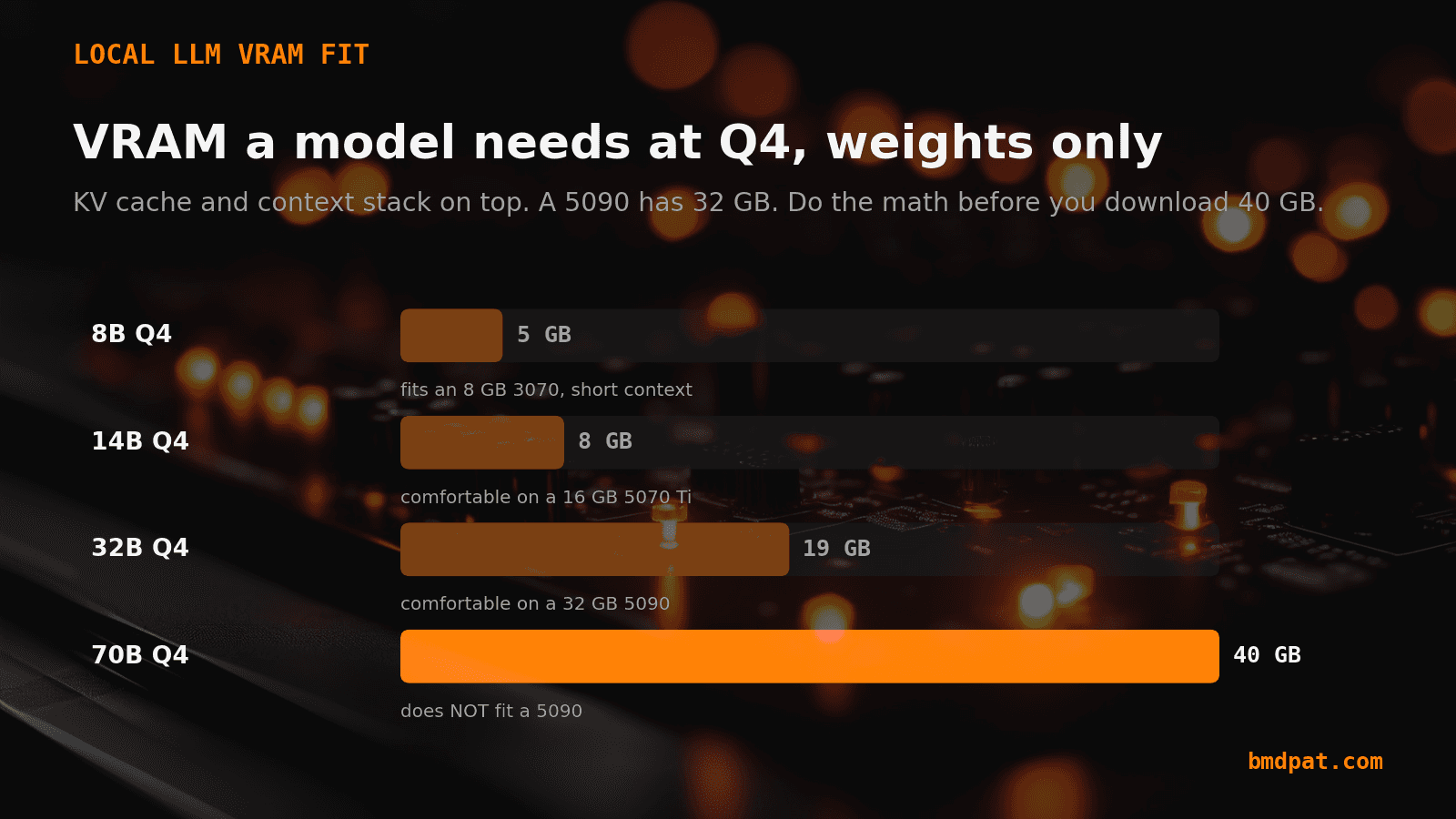
- At Q4 an 8B model is about 5 GB, a 14B is about 8 GB, a 32B is about 19 GB, and a 70B is about 40 GB. Those are weights only. They are the floor, not the total.
- Q4_K_M is the common sweet spot for local work. Dropping from Q4 to Q3 frees roughly another 20 percent, which is the escape hatch when a model is just barely too big.
- Estimate weights as parameter count times about 0.56 for Q4. Add a few gigabytes for KV cache at your target context. Leave 2 to 3 GB of headroom for the driver and overhead.
I have downloaded a 40 GB model onto a machine that could never run it. Twice. The download finished, the load failed, and the evening was gone.
The fix was not a bigger GPU. It was two minutes of arithmetic before hitting download. VRAM fit is predictable. You can do the math on the back of a napkin and skip the wasted download.
Local AI work rewards one habit: figure out what a run will cost before you start it, then cap it. That is true for VRAM before a download. It is just as true for tokens and time once an agent is looping on the model you fit. Same discipline, two different meters.
The short version: A local model's VRAM need is mostly its weights plus its KV cache. At Q4 the weights cost roughly half a gigabyte of VRAM per billion parameters, then context and KV cache stack on top. A 32 GB RTX 5090 fits a 32B model at Q4 with room left. A 70B at Q4 needs about 40 GB and does not fit on one 5090.
How much VRAM does a local model actually need?
Start with the weights, because that is the biggest number and the easiest to predict. At a Q4 quant, each parameter costs about 0.5 to 0.56 bytes. Multiply by the parameter count and you get the weights footprint.
That gives you a clean table: an 8B model is about 5 GB, a 14B is about 8 GB, a 32B is about 19 GB, and a 70B is about 40 GB. Those are weights only. They are the floor, not the total.
What does the quant level actually buy you?
Quantization trades precision for space. A full-precision weight is 16 bits. Q8 halves that, Q4 quarters it again, Q3 goes lower still. Fewer bits per weight means less VRAM and a small quality cost.
Q4_K_M is the common sweet spot for local work. It is where most people land because the quality drop is hard to notice on everyday tasks and the VRAM savings are large. Dropping from Q4 to Q3 frees roughly another 20 percent, which is your escape hatch when a model is just barely too big.
Why does a model fit and still run out of memory?
Because the weights are not the whole bill. The KV cache holds the attention state for every token in your context window, and it grows as the context grows. On a big model with a long context, that cache can add several gigabytes on top of the weights.
This is the trap. Your 19 GB of weights fit on a 32 GB card, so you load it, push the context to 32k tokens, and the load crashes. The weights fit. The weights plus a long context did not. Always budget for the cache, not just the file size.
What is a sane rule for owned hardware?
Match the model to the card with headroom to spare. Here is what I actually run.
An 8 GB RTX 3070 runs an 8B at Q4 with a short context. A 16 GB RTX 5070 Ti runs a 14B at Q4 comfortably. A 32 GB RTX 5090 runs a 32B at Q4 with real room left over.
The honest part: even a 5090 does not run a 70B at Q4 fully on the GPU. You would need Q3 with a short context, or you accept partial offload to system RAM and a big speed hit. Do not chase 70B on a single 32 GB card and expect it to feel fast.
How do I check before I download?
Three steps. Estimate the weights (parameter count times about 0.56 for Q4). Add a few gigabytes for KV cache at your target context. Leave 2 to 3 GB of headroom for the driver and overhead.
If the total clears your VRAM with headroom, download it. If it does not, drop a quant or drop a model size before you spend an hour pulling a file that will never load. The napkin is faster than the download.
What do you cap after the model fits?
Fitting the model is step one. Step two is running an agent on it without a runaway loop eating the resources you just budgeted for. A local agent that retries in a tight loop burns GPU time and tokens the same way a doomed download burns disk and an evening. The model fit. The loop around it did not.
So I apply the same napkin math at runtime. Before a local agent runs, I give it a hard budget, a token limit, and a rate limit, so one bad loop stops itself instead of running until I notice. That is exactly what AgentGuard does: runtime budget, token, and rate limits for AI agents, in one pip install. VRAM math keeps the model from failing to load. AgentGuard keeps the agent on that model from failing to stop.
Accompanying prompt
What the prompt does: It asks a model to estimate whether a given local LLM fits your GPU's VRAM and tells you the one thing to change if it does not.
Copy/paste this prompt:
Copy-ready prompt
Paste the exact block into your coding agent.
No article chrome, no footnotes, no formatting drift.
This prompt and every other one we publish live in the free prompt library.
Copy the block above.
Two minutes of this beats a 40 GB download that ends in an out-of-memory error. Cap the download with VRAM math, then cap the agent with AgentGuard. Predict the cost, then put a hard limit on it. That is the whole habit, on both meters.
FAQ
How much VRAM does a local model actually need?
Start with the weights. At Q4 each parameter costs about 0.5 to 0.56 bytes. An 8B model is about 5 GB, a 14B about 8 GB, a 32B about 19 GB, and a 70B about 40 GB. Then add KV cache.
Why does a model fit and still run out of memory?
The KV cache holds attention state for every token in the context window. 19 GB of weights can fit on a 32 GB card, then a 32k context crashes the load. Budget for the cache, not just the file size.
What is a sane rule for owned hardware?
An 8 GB RTX 3070 runs an 8B at Q4 with a short context. A 16 GB RTX 5070 Ti runs a 14B at Q4. A 32 GB RTX 5090 runs a 32B at Q4 with room left. A 70B at Q4 does not fit fully on one 5090.
Get the Local AI Field Kit
Four copy-ready tools now, then one evidence-backed Local AI Lab Note on Friday when there is something worth sharing.
Try the free agent run check firstGet the requested artifact now, then at most one evidence-backed Local AI Lab Note on Friday when there is something worth sharing. One-click unsubscribe. No sponsored placements. Privacy.
Patrick Hughes
I build BMD and publish measured AI runs, failure reports, and reusable checks. Nashville, Tennessee.
More writing
- 5 min
Local LLMs Need a Timeout Before They Need a Bigger Model
A bigger local model will not fix a stuck runtime. Add a bounded inference doctor first, then trust the benchmark.
- 6 min
Q4_K_M vs Q5_K_M vs Q8_0 vs IQ4_XS: GGUF Quants Explained (2026)
Which GGUF file do you download? Start with Q4_K_M when VRAM is tight, test Q5_K_M or Q8_0 on your real task, keep the smallest that passes. What each quant means, IQ4_XS vs K-quants, a test to copy.
- 5 min
Why Your Local Model Fits and Still Fails at Long Context
A local model can load and still run out of memory at longer context. Compare two controlled loads, inspect cache logs, and test the real workload.
- 5 min
49W Average Hid a 338W Burst on Gemma 26B
Gemma 4 26B Q4_K_M averaged 49 W on a long RTX 5090 run and peaked at 338 W. Keep both watt numbers before you compute energy per token.
- 5 min
Q4_K_M vs Q5_K_M (q4km vs q5km): Which to Download? (2026)
Stuck between q4km and q5km? Verdict: start with Q4_K_M on 8–24GB cards; move to Q5_K_M only if it still fits with KV-cache headroom. The 5-minute VRAM check inside.