Why Local LLM Benchmarks Need Power Data
A local LLM benchmark that reports only tokens per second hides the operating cost. My RTX 5090 run shows what power data adds.
TL;DR
- The Aug. 1, 2026 report records gemma4:26b in Ollama with a 2,048-token context. Fixed-task quality was 100% at both num_batch=256 and num_batch=512.
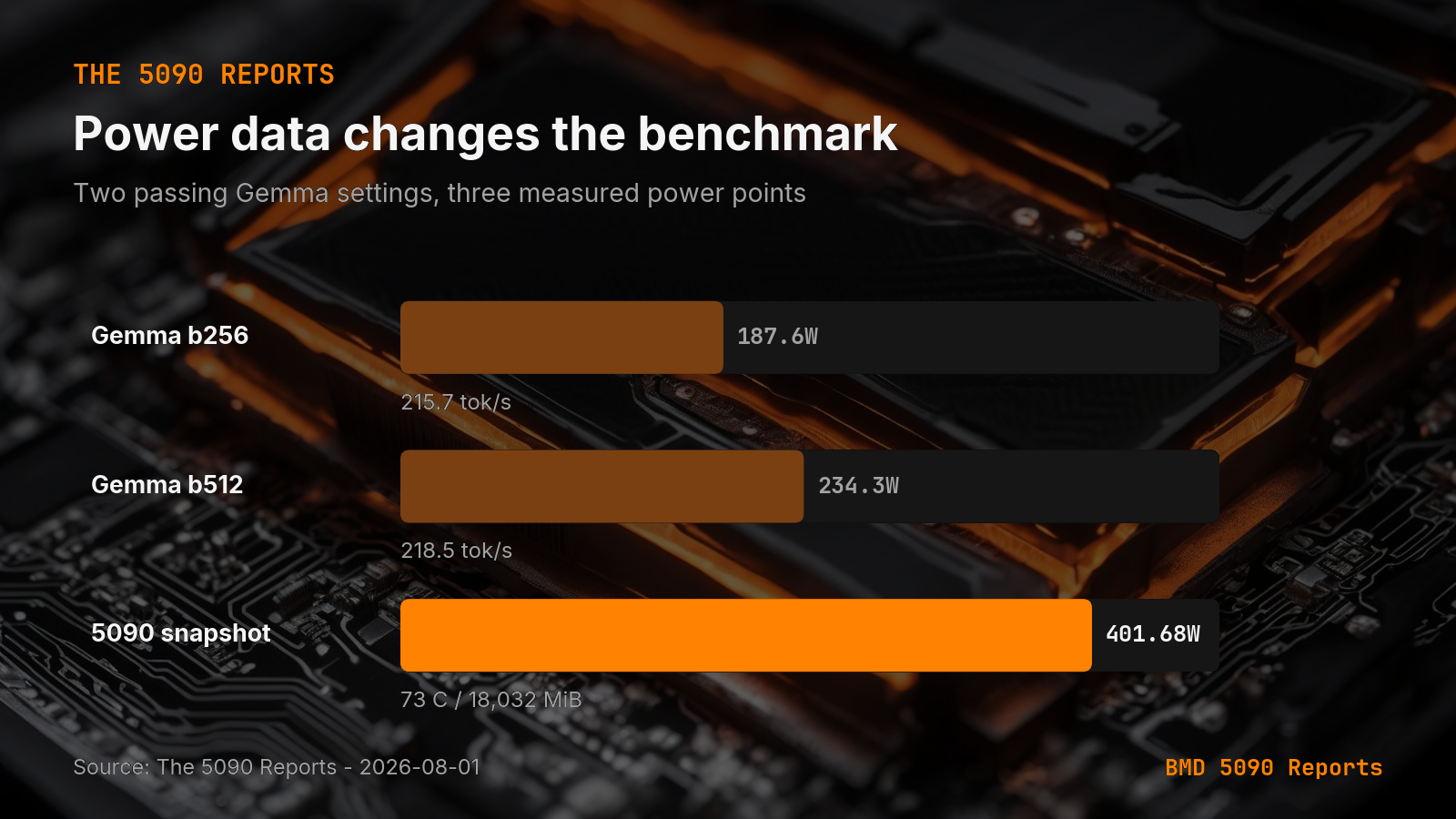
- At num_batch=256, Gemma produced 215.7 tok/s and averaged 187.6 W. At num_batch=512, it produced 218.5 tok/s and averaged 234.3 W. The second setting added 46.7 W for 2.8 tok/s.
- The snapshot listed an NVIDIA RTX 5090 with 32,607 MiB total memory, 73 C, and 401.68 W drawn against a 575 W limit. llama3.1:8b ran the same named workload at 227.79 tok/s with a 7,826 MiB VRAM peak. Gemma 26B ran it at 207.41 tok/s with a 20,233 MiB peak.
Tokens per second is useful, but it is not enough to choose a local model setting. Power draw tells you what the faster setting costs while it runs. On my RTX 5090, two Gemma 26B settings both passed the same fixed tasks, yet the faster one used much more power for a small speed gain.
 Open full-size image (opens in new tab)
What did the RTX 5090 run measure?
The Aug. 1, 2026 report records a workshop mix of three 200-token generation tasks and four code tasks. The model was gemma4:26b in Ollama with a 2,048-token context. The fixed-task quality result was 100% at both num_batch=256 and num_batch=512.
The report also records the machine state: an NVIDIA RTX 5090 with 32,607 MiB total memory, 73 C at the snapshot, and 401.68 W drawn against a 575 W limit. Those fields make the result easier to compare with a later run on the same machine or a different card.
What changed when I raised num_batch?
At num_batch=256, Gemma produced 215.7 tok/s and averaged 187.6 W. At num_batch=512, it produced 218.5 tok/s and averaged 234.3 W. The second setting added 46.7 W for 2.8 tok/s.
That is a poor trade if both settings meet the same quality bar and the workload is not waiting on prompt processing. The higher setting may still win for a batch job where wall-clock time matters more than power. The point is that the benchmark should expose the choice instead of hiding it behind one speed number.
Why does speed alone give the wrong answer?
A speed-only table encourages a single ranking. The fastest row looks like the winner. That ranking changes when you add power, quality, context length, and memory use.
The same report shows this in a smaller model. The llama3.1:8b agent-code task ran at 227.79 tok/s with a 7,826 MiB VRAM peak. Gemma 26B ran the same named workload at 207.41 tok/s with a 20,233 MiB VRAM peak. These are not interchangeable rows. They describe different memory and quality choices.
I keep the measurement fields together because local model selection is a fit problem first. My earlier notes on VRAM fit and runtime support cover the load gate. The 5090 phase timing receipt covers why one end-to-end latency number can hide the slow phase.
What fields should a local LLM benchmark include?
Record these fields for every meaningful run:
- Model and quantization.
- Runtime and version.
- Context length, prompt size, and output limit.
- Task name and fixed quality result.
- Tokens per second.
- Average and peak power when available.
- VRAM peak and the GPU memory ceiling.
- A timestamp and the exact machine.
Do not compare rows that change several of these fields at once. If the model, runtime, prompt, and task all change, the speed difference cannot tell you which change mattered.
What should I change in my own benchmark loop?
Add power and quality as first-class columns. Keep the prompt and task set fixed. Run the same setting more than once when the result will drive a production choice. Store the raw output with the summary so a surprising row can be checked later.
The useful question is not “Which setting is fastest?” It is “Which setting meets the quality bar at an acceptable power and memory cost?” That answer belongs in the report beside tok/s.
Accompanying prompt
What the prompt does: It turns a local model run into a comparable benchmark row with speed, quality, power, and memory fields.
Copy/paste this prompt:
Copy-ready prompt
Paste the exact block into your coding agent.
No article chrome, no footnotes, no formatting drift.
This prompt and every other one we publish live in the free prompt library.
Copy the block above.
Get the artifact-backed local AI lab notes by email: https://bmdpat.com/5090-reports
FAQ
Why add power data to a local LLM benchmark?
Tokens per second hides operating cost. Two Gemma 26B settings both passed the same fixed tasks, yet batch 512 added 46.7 W for 2.8 tok/s.
What did the Aug. 1, 2026 RTX 5090 run measure?
A workshop mix of three 200-token generation tasks and four code tasks. Quality was 100% at num_batch=256 (215.7 tok/s, 187.6 W) and num_batch=512 (218.5 tok/s, 234.3 W).
What fields should every meaningful run include?
Model and quantization, runtime and version, context, prompt size, output limit, task name and quality result, tokens per second, average and peak power, VRAM peak and GPU memory ceiling, timestamp, and the exact machine.
Get the Local AI Field Kit
Four copy-ready tools now, then one evidence-backed Local AI Lab Note on Friday when there is something worth sharing.
Try the free agent run check firstGet the requested artifact now, then at most one evidence-backed Local AI Lab Note on Friday when there is something worth sharing. One-click unsubscribe. No sponsored placements. Privacy.
Written by
Patrick Hughes
I build BMD and publish measured AI runs, failure reports, and reusable checks. Nashville, Tennessee.
More writing
- 5 min
VRAM Fit Is Not Runtime Support
A local model can fit in VRAM, download cleanly, and still fail before the first token. My 5090 test adds runtime support as a separate gate.
- 5 min
My Local Blog Writer Drops Private Lines First
My local blog writer reads a daily log. I remove private lines before drafting, then check the output again. Here is what those checks can miss.
- 5 min
Ollama JSON: Empty Results Are Not Failed Requests
An empty Ollama result can mean no matches or a broken request. I test the response parser so local extraction failures cannot pass as clean results.
- 5 min
Log Local LLM Fallbacks Before You Score the Output
My local writer hit a host RAM guard, then Sonnet produced a draft that failed QA. Here is how I separate availability, model identity, and useful output.
- 5 min
My local daily brief used 0 model calls
On September 4, 2026 my llama3.1:8b daily brief was ready with 0 model calls and 0 seconds. Preview-only file ranking is not a model run.