How I Budget VRAM for Shared Local AI Workloads
My RTX 5090 measurements show how I budget VRAM for a local model, a real workload, and the GPU processes that must stay resident beside it.
TL;DR
- July 2026 measurements used one RTX 5090 with 32,607 MiB reported by nvidia-smi. Two Q4_K_M models ran through Ollama 0.31.1 across short generation, long-context summarization, and a code task.
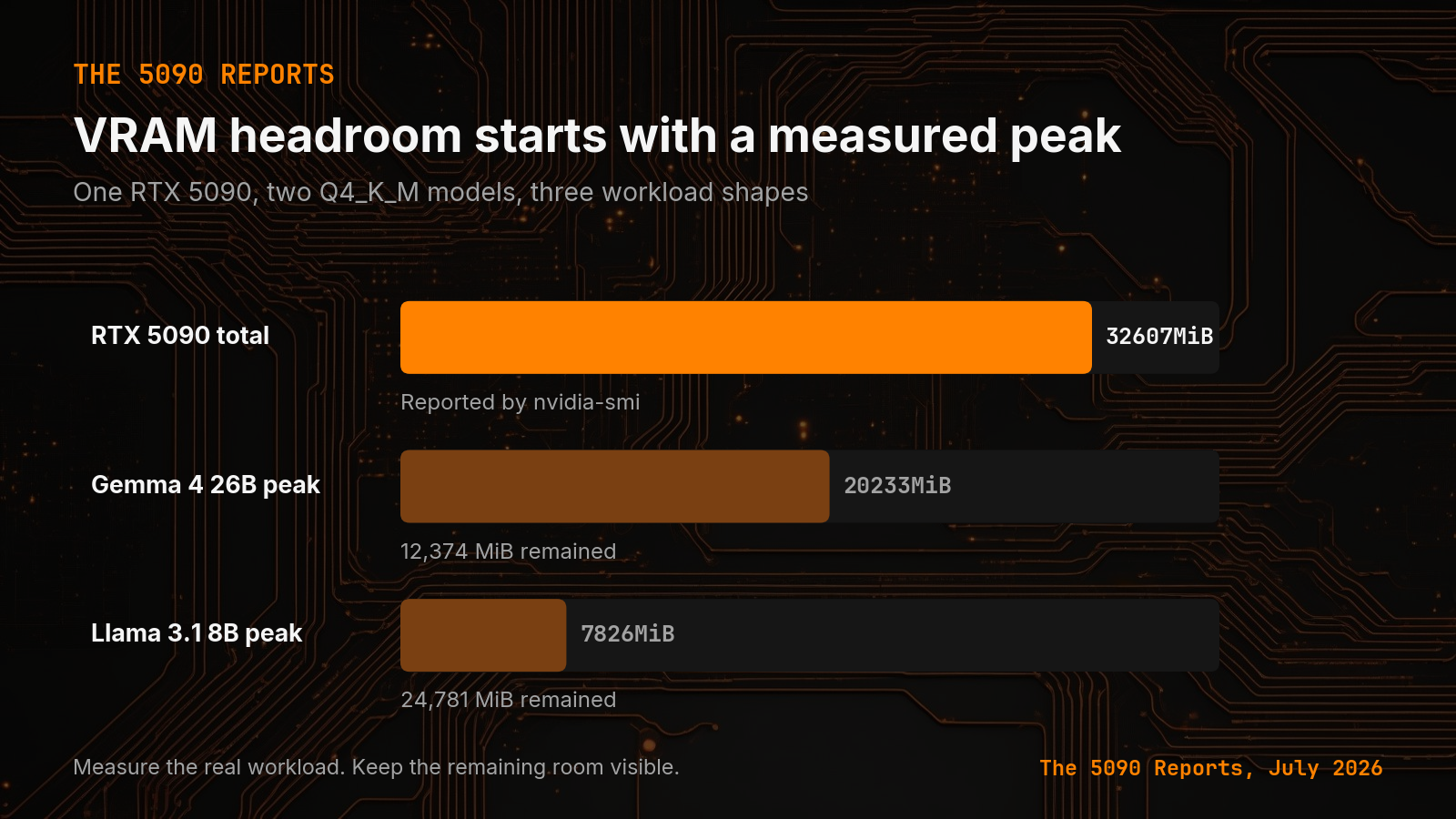
- The highest loaded-memory reading for gemma4:26b was 20,233 MiB. That left 12,374 MiB between the observed peak and the card total. llama3.1:8b peaked at 7,826 MiB and left 24,781 MiB.
- The Gemma peak used about 62 percent of reported card memory. Do not turn the remaining 38 percent into a blanket recommendation. Treat 12,374 MiB as a budget that still needs named owners.
A model file that fits in VRAM can still fail when the real job starts.
The short answer: I do not reserve a fixed VRAM percentage. I measure the peak with the exact model, quant, context, and workload. Then I assign the remaining memory to named GPU processes or leave it free. Canonical URL: https://bmdpat.com/blog/local-llm-vram-headroom-2026
 Open full-size image (opens in new tab)
Why does shared GPU work change the VRAM decision?
The model file is not the loaded-memory measurement. The observed peak is the number I can verify on my machine, so that is the number I use for a memory budget.
That is why I do not size a local model from the download page. I run the workload and record the peak. A model that barely loads has not passed the deployment test. It has only passed the first boundary.
The distinction matters when the machine does more than inference. A coding worker may also run a browser, a vision encoder, or another model. Those neighbors need capacity too. If the plan depends on every last MiB staying free, the route has no room for the full job.
What did I measure on the RTX 5090?
My July 2026 measurement report used one RTX 5090 with 32,607 MiB reported by nvidia-smi. NVIDIA documents memory.total as total installed GPU memory, with some memory reserved by the driver. I ran two Q4_K_M models through Ollama 0.31.1 across short generation, long-context summarization, and a code task.
The highest loaded-memory reading for gemma4:26b was 20,233 MiB. That left 12,374 MiB between the observed peak and the card total.
The highest reading for llama3.1:8b was 7,826 MiB. That left 24,781 MiB by the same subtraction.
Those gaps are measured room on one machine, not promises for another build. They do not prove that every other process can use all remaining VRAM. They show the part of the card the tested model did not occupy during those runs.
Why do I avoid a fixed VRAM percentage?
I would not start with a universal percentage. A fixed rule hides the variables that caused the memory use.
Start with the largest workload you expect. Use the intended context length, batch setting, runtime version, and output cap. Record the highest loaded-memory reading. Repeat the run if the route matters.
Then name what else must share the card. A second resident model, image encoder, speech model, desktop display, or other GPU job changes the answer. Assign capacity to those named neighbors. Do not call unnamed empty space a plan.
This is also why I keep workload shape attached to every speed result. My three-workload sizing sweep kept short generation, long context, and code separate. The same discipline belongs in memory measurements.
How do I assign the remaining VRAM?
I want enough measured room for the largest planned job plus the processes that must coexist with it. I also want a failed allocation to reject the route before production work reaches it.
For my measured Gemma route, the observed peak used about 62 percent of reported card memory. I do not turn the remaining 38 percent into a blanket recommendation. I treat 12,374 MiB as a budget that still needs named owners.
That framing makes tradeoffs clear. I can spend some of the room on a longer context, another local component, or protection against variation. If I cannot name what gets the room, I keep it free.
The smaller Llama route left much more space in this sweep. That can matter more than its speed when I need several local workers on the same machine. Model quality still has to pass its own task gate. A small model with empty VRAM is not useful if its output fails.
How do I test the full shared workload?
First, load the exact model and quant you plan to keep. Similar names are not a substitute for the file you will run.
Second, run the largest expected context and the real job shape. Watch loaded memory during the run, not only after startup.
Third, record the card total, observed peak, remaining room, runtime version, context, batch setting, and workload. Keep the measurement beside the route.
Fourth, run the task check. My local LLM benchmark reading guide explains why a memory pass and a speed number are not enough. The output still needs a denominator and a verifier.
Finally, reject any route that works only when the rest of the GPU stays quiet. A deployment plan should name its shared processes and its failure boundary.
Accompanying prompt
What the prompt does: It turns measured local LLM memory use into a shared-GPU budget with named owners and a pass or fail rule.
Copy/paste this prompt:
Copy-ready prompt
Paste the exact block into your coding agent.
No article chrome, no footnotes, no formatting drift.
This prompt and every other one we publish live in the free prompt library.
Copy the block above.
I publish measured local AI build notes in The 5090 Reports. Join the email list for the next result.
FAQ
How should I budget VRAM for a local model?
Do not reserve a fixed percentage. Measure the peak with the exact model, quant, context, and workload. Then assign remaining memory to named GPU processes or leave it free.
What peaks did the RTX 5090 sweep record?
gemma4:26b peaked at 20,233 MiB of 32,607 MiB (12,374 MiB remaining). llama3.1:8b peaked at 7,826 MiB (24,781 MiB remaining).
Why avoid a fixed VRAM percentage?
A fixed rule hides the variables that caused the memory use. The Gemma route used about 62 percent of reported memory. The leftover 38 percent is not a plan until it has named owners.
Get the Local AI Field Kit
Four copy-ready tools now, then one evidence-backed Local AI Lab Note on Friday when there is something worth sharing.
Try the free agent run check firstGet the requested artifact now, then at most one evidence-backed Local AI Lab Note on Friday when there is something worth sharing. One-click unsubscribe. No sponsored placements. Privacy.
Written by
Patrick Hughes
I build BMD and publish measured AI runs, failure reports, and reusable checks. Nashville, Tennessee.
More writing
- 5 min
Why I Test 3 Workloads Before Sizing a Local LLM
One local LLM speed number hides the work behind it. My RTX 5090 sweep shows why short generation, long context, and code need separate rates.
- 5 min
Log Local LLM Fallbacks Before You Score the Output
My local writer hit a host RAM guard, then Sonnet produced a draft that failed QA. Here is how I separate availability, model identity, and useful output.
- 5 min
My local daily brief used 0 model calls
On September 4, 2026 my llama3.1:8b daily brief was ready with 0 model calls and 0 seconds. Preview-only file ranking is not a model run.
- 5 min
Long Context Cost Me VRAM, Not Tokens a Second
A 94x bigger prompt cost llama3.1:8b only 9.7% of its generation rate. VRAM rose 656 MiB, but num_ctx doubled in the same step. Budget memory first.
- 5 min
One model logged 14.5 and 6,178 prompt tokens a second
gemma4:26b read 53 prompt tokens at 14.5 tok/s and 4,470 at 6,178.9 on the same RTX 5090 run set. Prompt speed is not one number.