Why I Test 3 Workloads Before Sizing a Local LLM
One local LLM speed number hides the work behind it. My RTX 5090 sweep shows why short generation, long context, and code need separate rates.
TL;DR
- Two Q4_K_M models ran through Ollama 0.31.1 on one RTX 5090. The jobs were short-gen-256, long-context-summarize, and agent-code-task-512.
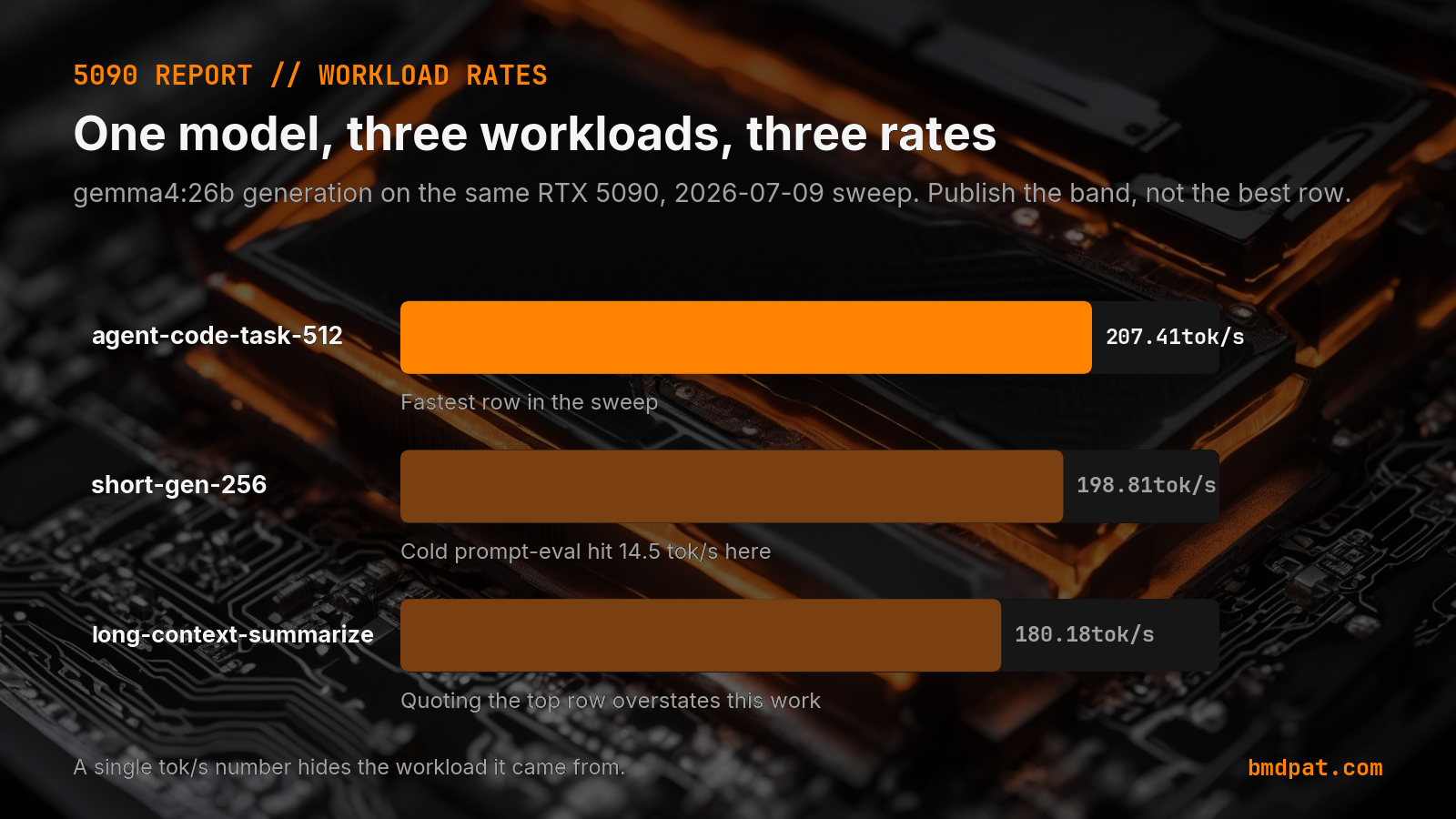
- gemma4:26b generated 198.81 tokens per second on the short job, 180.18 on the long-context job, and 207.41 on the code task. Peak loaded memory reached 20,233 MiB. llama3.1:8b measured 228.87, 206.74, and 227.79 tokens per second, with a 7,826 MiB peak.
- Gemma load duration was about 138 to 142 seconds. Llama loaded in about 3.28 to 3.31 seconds. The gemma4:26b code row was 15.1 percent faster than its long-context row.
A model can look fast on one prompt and still be the wrong choice for the work you plan to run.
The short answer: I size local models with at least three workload shapes: short generation, long-context summarization, and a code task. In my July 9, 2026 RTX 5090 sweep, gemma4:26b ranged from 180.18 to 207.41 generated tokens per second across those jobs. The range mattered more than the fastest row. Canonical URL: https://bmdpat.com/blog/local-llm-workload-rates-rtx-5090-sweep-2026
 Open full-size image (opens in new tab)
Why is one tokens-per-second number not enough?
Tokens per second describes a run. It does not describe every job the model will see.
A short chat prompt spends little time reading input. A summarization job may read thousands of tokens before it writes one. A coding agent can stop early when it completes the requested output, or burn the full output cap when it misses the stop condition.
Those paths stress different parts of the runtime. If I publish only the best generation row, I hide the slow case that may dominate the real queue.
I made this mistake when I first treated model speed as one field in a routing table. The field looked precise. The route was not. Now I attach the workload, context, input count, output count, runtime version, and completion reason to every rate.
What did the RTX 5090 sweep measure?
I tested two Q4_K_M models through Ollama 0.31.1 on one RTX 5090. The three jobs were short-gen-256, long-context-summarize, and agent-code-task-512.
For gemma4:26b, measured generation was 198.81 tokens per second on the short job, 180.18 on the long-context job, and 207.41 on the code task. Peak loaded memory reached 20,233 MiB.
For llama3.1:8b, the same job shapes measured 228.87, 206.74, and 227.79 tokens per second. Peak loaded memory reached 7,826 MiB.
These are measurements from my machine, driver, model files, and prompts. They are not promises for another rig. They are useful because every row keeps its workload attached.
What does the workload range change?
The gemma4:26b code row was 15.1 percent faster than its long-context row. The llama3.1:8b short row was 10.7 percent faster than its long-context row.
That spread is large enough to change a capacity plan. A worker sized from the top row can miss its queue target when summarization becomes the common job. A user waiting on one response may care more about the slow row than the average.
I do not turn these rates into a universal model ranking. The smaller Llama model was faster and used less memory in this sweep. I still use Gemma for some drafting work because speed and fit are only two gates. The output also has to pass the task check.
This is the same reason I kept num_batch 256 after my Ollama batch sweep. The largest number in one column did not decide the setting.
Why does cold load belong in the sizing decision?
The steady generation rows hide startup time. In the same sweep, Gemma load duration was about 138 to 142 seconds. Llama loaded in about 3.28 to 3.31 seconds.
That does not make Gemma unusable. It changes the deployment. A scheduled job that starts a fresh model process for every task pays that load cost again. A persistent server can keep the model resident and make the steady rate relevant.
Context changes can also trigger reloads. I measured that failure mode separately in my Ollama context reload test. Model, quant, and context therefore belong in the routing key.
For a desktop chat, a cold wait may be annoying. For a five-minute agent schedule, it can consume nearly half of the run window. I record both steady generation and cold load before I call a model deployable.
How do I size a local model from the results?
First, reject any model that does not fit with room for the KV cache and the rest of the process. Peak loaded memory is a gate, not a footnote.
Second, test the job shapes your queue will run. I use a short prompt, a long input, and one tool or code task as the minimum set. Keep context, output caps, and runtime versions in the record.
Third, capture cold load. If it is large, decide whether the service will stay resident. Do not mix a persistent-server rate with a process-per-task design.
Fourth, run a task verifier. A fast answer that breaks the schema, misses the stop rule, or fails the code check is not capacity.
The final sizing record should name the model, quant, GPU, peak memory, rate by workload, cold load, and verifier result. That is enough to make a route you can test again after a model or runtime update.
Accompanying prompt
What the prompt does: It turns local LLM benchmark rows into a workload-aware sizing decision without inventing missing measurements.
Copy/paste this prompt:
Copy-ready prompt
Paste the exact block into your coding agent.
No article chrome, no footnotes, no formatting drift.
This prompt and every other one we publish live in the free prompt library.
Copy the block above.
I publish measured local AI build notes in The 5090 Reports. Join the email list for the next result.
FAQ
Why test three workloads before sizing a local LLM?
A short chat, a long-context summary, and a code task stress different parts of the runtime. gemma4:26b ranged from 180.18 to 207.41 generated tokens per second across those jobs.
What did the July 9, 2026 RTX 5090 sweep measure?
gemma4:26b: 198.81 / 180.18 / 207.41 tok/s and 20,233 MiB peak. llama3.1:8b: 228.87 / 206.74 / 227.79 tok/s and 7,826 MiB peak. Ollama 0.31.1, Q4_K_M.
Why does cold load belong in the sizing decision?
Gemma load duration was about 138 to 142 seconds. Llama loaded in about 3.28 to 3.31 seconds. A process-per-task design pays that cost again. A resident server does not.
Get the Local AI Field Kit
Four copy-ready tools now, then one evidence-backed Local AI Lab Note on Friday when there is something worth sharing.
Try the free agent run check firstGet the requested artifact now, then at most one evidence-backed Local AI Lab Note on Friday when there is something worth sharing. One-click unsubscribe. No sponsored placements. Privacy.
Written by
Patrick Hughes
I build BMD and publish measured AI runs, failure reports, and reusable checks. Nashville, Tennessee.
More writing
- 6 min
LM Studio Bionic: The Local Open-Model Agent, Explained (2026)
Is LM Studio Bionic worth a look? It runs code projects on a local folder with GLM 5.2 and Kimi K2.7 Code, local voice via Voxtral, and is free with local models. What shipped, and what it changes.
- 5 min
Log Local LLM Fallbacks Before You Score the Output
My local writer hit a host RAM guard, then Sonnet produced a draft that failed QA. Here is how I separate availability, model identity, and useful output.
- 5 min
My local daily brief used 0 model calls
On September 4, 2026 my llama3.1:8b daily brief was ready with 0 model calls and 0 seconds. Preview-only file ranking is not a model run.
- 5 min
Long Context Cost Me VRAM, Not Tokens a Second
A 94x bigger prompt cost llama3.1:8b only 9.7% of its generation rate. VRAM rose 656 MiB, but num_ctx doubled in the same step. Budget memory first.
- 5 min
One model logged 14.5 and 6,178 prompt tokens a second
gemma4:26b read 53 prompt tokens at 14.5 tok/s and 4,470 at 6,178.9 on the same RTX 5090 run set. Prompt speed is not one number.