Ollama num_batch: 256 Was My RTX 5090 Sweet Spot
I tested four Ollama settings on Gemma 4 26B. num_batch 256 delivered nearly all the speed of 512 while using less power on my RTX 5090.
TL;DR
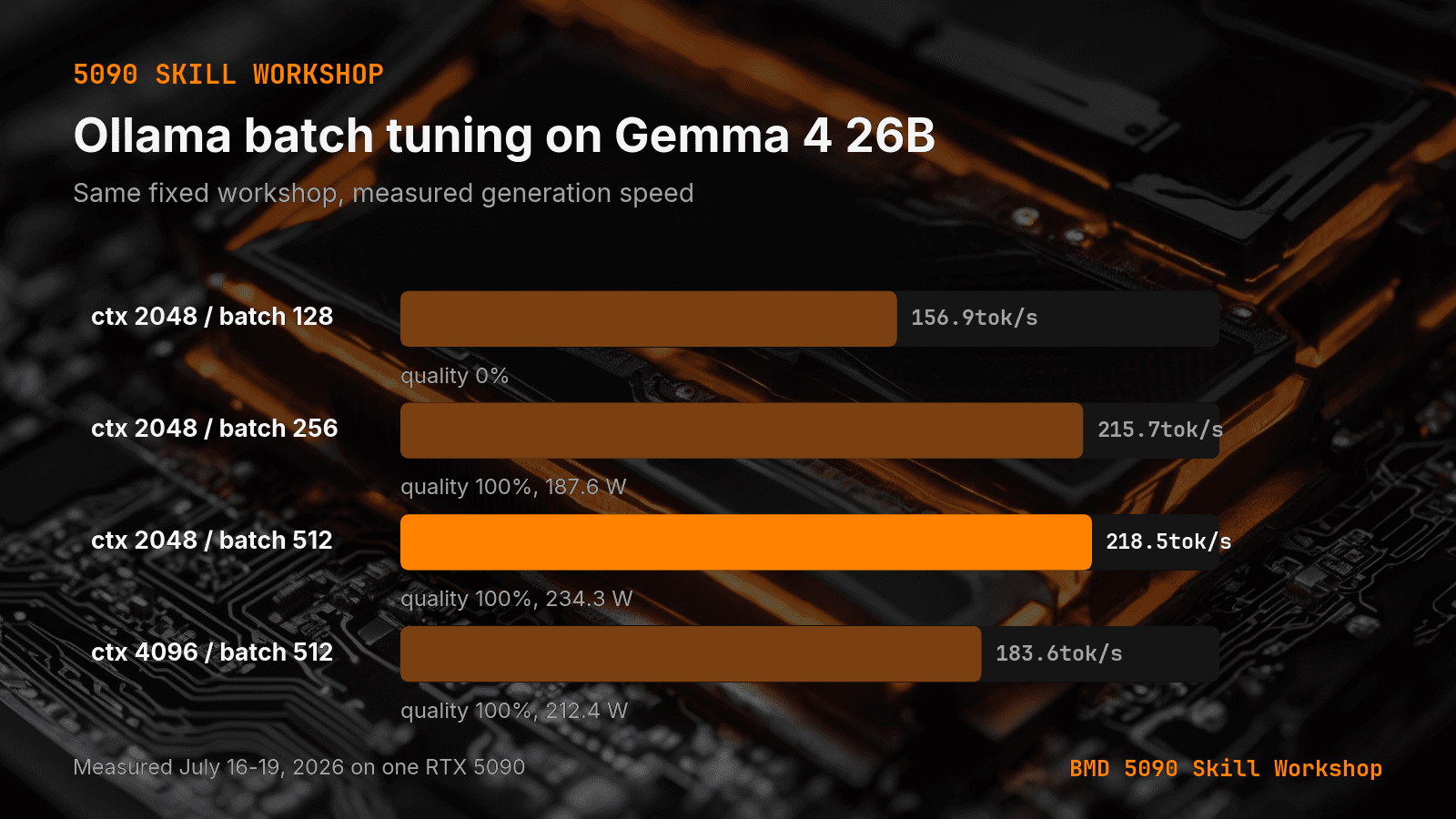
- In a four-run gemma4:26b workshop, moving num_batch from 128 to 256 raised measured throughput from 156.9 to 215.7 tokens per second. Moving from 256 to 512 reached 218.5 tokens per second, only 1.3 percent faster, while average GPU power rose from 187.6 to 234.3 watts.
- At batch 128 the coding checks scored zero percent, so that speed delta is not a clean batch-only benchmark. At batch 256 all four checks passed. At batch 512 the same checks passed.
- A July 19 run kept batch at 512 and moved context from 2,048 to 4,096. Throughput fell from 218.5 to 183.6 tokens per second. The four coding checks still passed. Average power measured 212.4 watts. That run was discarded.
I changed one Ollama setting and got 37.5 percent more generation speed from the same local model. Then I doubled it again, burned more power, and gained almost nothing.
The short answer: In my four-run gemma4:26b workshop, moving num_batch from 128 to 256 raised measured throughput from 156.9 to 215.7 tokens per second. Moving from 256 to 512 reached 218.5 tokens per second, only 1.3 percent faster, while average GPU power rose from 187.6 to 234.3 watts. For this RTX 5090 workload, 256 was the practical setting. Canonical URL: https://bmdpat.com/blog/ollama-num-batch-rtx-5090-2026
What is num_batch in Ollama?
Ollama exposes num_batch inside the options object on the generate API. The official API reference lists it beside settings such as num_ctx, num_gpu, and num_thread.
That makes it a runtime setting to measure, not a quality score. I did not assume a larger value would produce a better completed task. The useful value can change with the model, context, GPU, prompt shape, and runtime version.
I wanted a measured setting for my own machine, not a copied default. The workshop changed one configuration at a time and recorded speed, average power when available, and a fixed coding check.
What did the RTX 5090 workshop measure?
The model was gemma4:26b through Ollama. Each run used three short generation prompts capped at 200 output tokens plus four fixed coding tasks with deterministic checks. The first three runs held context at 2,048 and tested batch values of 128, 256, and 512.
At batch 128, throughput measured 156.9 tokens per second. The coding checks scored zero percent on that run, so I do not treat its speed delta as a clean batch-only benchmark. It still exposed a bad configuration for the whole job.
At batch 256, throughput reached 215.7 tokens per second and all four checks passed. Average GPU power measured 187.6 watts. At batch 512, throughput reached 218.5 tokens per second with the same passing checks, while average power measured 234.3 watts.
These are workshop measurements from July 16 through July 18, 2026. They are not vendor claims and they do not predict another GPU.
Why did I keep 256 instead of 512?
The extra 256 batch units bought 2.8 tokens per second. That is a 1.3 percent speed gain. Average power increased by 46.7 watts, about 24.9 percent.
I will take a large speed gain when it removes real wait time. I will not pay a quarter more power for a change I cannot feel in the workflow. Batch 256 captured 98.7 percent of the measured batch-512 speed at the same context, while keeping the passing task result.
This is why I tune for completed work instead of the largest allowed number. The setting with the highest throughput was technically 512. The setting I would deploy was 256.
What happened when context doubled?
The July 19 run kept batch at 512 and moved context from 2,048 to 4,096. Throughput fell from 218.5 to 183.6 tokens per second. The four coding checks still passed, and average power measured 212.4 watts.
That run was discarded because the earlier 2,048-context setting was faster at the same quality score. It also reinforced a rule from my Ollama context reload test: context belongs in the measured configuration. A batch result without its context value is incomplete.
The prompt totals were small, so the larger context did not help the task. I would only pay for it when the input needs it.
How should you tune num_batch on your own GPU?
Hold the model, quant, context, prompts, output cap, and runtime version steady. Test a small ladder such as 128, 256, and 512. Record throughput, loaded memory, average power, and a task-level pass or fail.
Do not keep a setting because it wins one speed column. Reject any run that breaks the output contract. Then choose the smallest setting that captures nearly all of the useful speed with enough memory headroom for the real workload.
The same rule applies to model choice. My Ternary Bonsai comparison kept the larger Gemma default because instruction compliance beat file size. Runtime tuning should use the same gate: fit, run, verify, then keep.
Accompanying prompt
What the prompt does: It turns local Ollama benchmark rows into a measured num_batch recommendation without inventing missing data.
Copy/paste this prompt:
Copy-ready prompt
Paste the exact block into your coding agent.
No article chrome, no footnotes, no formatting drift.
This prompt and every other one we publish live in the free prompt library.
Copy the block above.
I publish measured local AI build notes in The 5090 Reports. Join the email list for the next result.
FAQ
What is num_batch in Ollama?
A runtime option on the generate API, listed beside num_ctx, num_gpu, and num_thread. Measure it. Do not treat a larger value as a better completed task.
Why keep 256 instead of 512?
The extra 256 batch units bought 2.8 tokens per second, a 1.3 percent speed gain, while average power increased 46.7 watts, about 24.9 percent. Batch 256 captured 98.7 percent of the batch-512 speed at the same context.
What happened when context doubled?
At batch 512, context 4,096 dropped throughput from 218.5 to 183.6 tok/s. Checks still passed. The faster 2,048-context setting was kept.
Get the Local AI Field Kit
Four copy-ready tools now, then one evidence-backed Local AI Lab Note on Friday when there is something worth sharing.
Try the free agent run check firstGet the requested artifact now, then at most one evidence-backed Local AI Lab Note on Friday when there is something worth sharing. One-click unsubscribe. No sponsored placements. Privacy.
Written by
Patrick Hughes
I build BMD and publish measured AI runs, failure reports, and reusable checks. Nashville, Tennessee.
More writing
- 5 min
A 7 GB 27B Model Lost to My 17 GB Default
A 6.66 GiB ternary 27B model fit my RTX 5090, but it lost the default slot. File size is only the first local model-selection gate.
- 5 min
Log Local LLM Fallbacks Before You Score the Output
My local writer hit a host RAM guard, then Sonnet produced a draft that failed QA. Here is how I separate availability, model identity, and useful output.
- 5 min
My local daily brief used 0 model calls
On September 4, 2026 my llama3.1:8b daily brief was ready with 0 model calls and 0 seconds. Preview-only file ranking is not a model run.
- 5 min
Long Context Cost Me VRAM, Not Tokens a Second
A 94x bigger prompt cost llama3.1:8b only 9.7% of its generation rate. VRAM rose 656 MiB, but num_ctx doubled in the same step. Budget memory first.
- 5 min
One model logged 14.5 and 6,178 prompt tokens a second
gemma4:26b read 53 prompt tokens at 14.5 tok/s and 4,470 at 6,178.9 on the same RTX 5090 run set. Prompt speed is not one number.