Does Ollama Include That New llama.cpp Feature?
A llama.cpp release note does not prove that Ollama can use the feature. I trace the active runtime path, pin versions, and test the same workload.
TL;DR
- The sizing desk sends requests to the Ollama HTTP API. Ollama includes its own llama.cpp code, so a new upstream release reaches this path only after Ollama includes the needed change.
- For the August 6, 2026 test the path ended at Ollama 0.31.2. No standalone llama-cli or llama-bench binary was on the host path.
- Three warm llama3.1:8b runs produced 173.13, 174.91, and 173.34 tokens per second. The GPU used 7,262 MiB of 32,607 MiB. The June run recorded 216.89 tokens per second on Ollama 0.22.1, but host conditions did not match.
A new llama.cpp release can look like an instant upgrade. That release note does not prove that my local application can use it.
Short answer: I trace the request from my application to the engine that runs the model. I pin that engine version, test the same workload, and keep the old recommendation until the new code reaches the active path.
Why is the release note not enough?
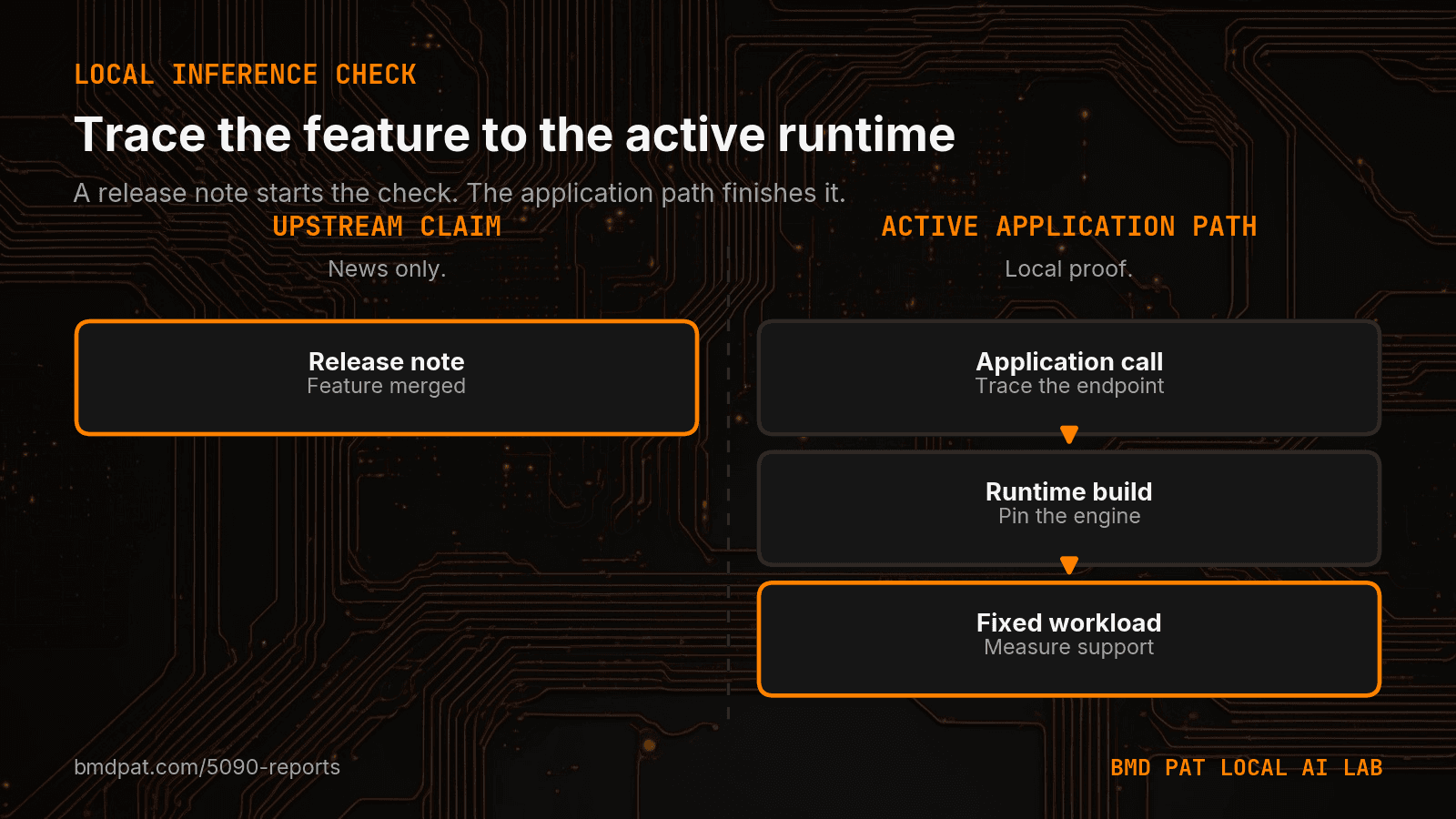
My sizing desk sends requests to the Ollama HTTP API. It does not call a standalone llama.cpp binary. Ollama includes its own llama.cpp code, so a new upstream release reaches my path only after Ollama includes the needed change.
The b10258 release is narrower than a new feature. It moves n_vocab from shared sampler data into the penalty sampler. That is internal sampler wiring, not proof that Ollama exposes a new capability. The upstream code can exist while my installed runtime still uses an older code base. A benchmark against the wrong binary answers the wrong question.
I treat runtime support as a separate gate from model fit. A model can fit in memory and still fail before its first useful token. I cover that first boundary in VRAM Fit Is Not Runtime Support.
How do I map the active local inference path?
I start at the application call. I write down the endpoint, process, and executable that receive the request. Then I find which component owns model loading and token generation.
For my test on August 6, 2026, the path ended at Ollama 0.31.2. No standalone llama-cli or llama-bench binary was on the host path. Testing a fresh llama.cpp build would have measured a different system from the sizing desk.
This check is simple, but it blocks a common error. The name in a release note is not the same thing as the code in production. The active executable and its version are the facts that matter.
What did my RTX 5090 smoke test prove?
I used the same llama3.1:8b request shape as an earlier baseline. The test fixed num_ctx at 2,048, num_predict at 128, and temperature at zero. Ollama reported full GPU placement during the run.
Three warm runs produced 173.13, 174.91, and 173.34 tokens per second. The spread was under 1%. The GPU used 7,262 MiB of 32,607 MiB, and Ollama showed a 5.0 GB resident model.
Those results proved that the active sizing path gave repeatable numbers in that session. They did not prove that llama.cpp b10258 was active. The installed Ollama build still owned the path, so I made no feature claim and changed no sizing recommendation.
Why did I not compare the new result with the old baseline?
The June run recorded 216.89 tokens per second on Ollama 0.22.1. The August warm runs were near 174 tokens per second. That looks like a drop of about 20%, but the host conditions did not match.
The August test ran while two package installs and the agent fleet used the same host. The first model load took 135 seconds on the busy disk, compared with 3.2 seconds in June. That test cannot isolate a runtime change.
I recorded the difference as an open question. A quiet-host rerun can test it later. This is why I bind each result to the driver, runtime, workload, and time in How I Keep LLM Results Valid After a Driver Update.
What evidence should change a recommendation?
I need four receipts. First, the target feature must exist upstream. Second, the active runtime must include it. Third, the model and setting must expose it. Fourth, the same workload must show a useful result without a quality loss.
A version string alone clears only one part of that chain. A fast test against a separate binary also falls short. I change the recommendation only when the application path and the measured path are the same.
This rule saves time. It keeps release news in a watch list until my software can use it. It also keeps a new speed result from reaching the sizing desk before the result has the right runtime and workload behind it.
Accompanying prompt
What the prompt does: This prompt checks whether a new local inference feature has reached the runtime that an application uses.
Copy/paste this prompt:
Copy-ready prompt
Paste the exact block into your coding agent.
No article chrome, no footnotes, no formatting drift.
This prompt and every other one we publish live in the free prompt library.
Copy the block above.
Get measured local AI notes by email at The 5090 Reports.
FAQ
Why is the llama.cpp release note not enough?
A new upstream release reaches this path only after Ollama includes the needed change. The b10258 release moves n_vocab into the penalty sampler. That is internal sampler wiring, not proof that Ollama exposes a new capability.
What did the RTX 5090 smoke test prove?
The active sizing path gave repeatable numbers in that session: three warm runs under 1% spread. It did not prove that llama.cpp b10258 was active. No feature claim and no sizing recommendation changed.
What evidence should change a recommendation?
The target feature must exist upstream, the active runtime must include it, the model and setting must expose it, and the same workload must show a useful result without a quality loss.
Get the Local AI Field Kit
Four copy-ready tools now, then one evidence-backed Local AI Lab Note on Friday when there is something worth sharing.
Try the free agent run check firstGet the requested artifact now, then at most one evidence-backed Local AI Lab Note on Friday when there is something worth sharing. One-click unsubscribe. No sponsored placements. Privacy.
Patrick Hughes
I build BMD and publish measured AI runs, failure reports, and reusable checks. Nashville, Tennessee.
More writing
- 5 min
My Local LLM Got Faster After It Passed the Tests
A three-run RTX 5090 test showed why local LLM tuning must pair speed with fixed-task checks. One faster setting also repaired every test.
- 5 min
My 5090 benchmark was missing the field I needed most
A fresh Qwen3.5 9B run showed 84.94 tok/s, but the useful number was the 6,105 ms load phase. I added phase timings and capture time to the benchmark receipt.
- 6 min
Search Old Results Before Publishing an LLM Test
An independent QA pass caught my second post about the same Ollama batch sweep. Here is the duplicate check I now run before publishing an LLM result.
- 6 min
Why I Benchmark Local LLM Input and Output Separately
My RTX 5090 runs show why model loading, prompt ingestion, token generation, and task checks need separate measurements before production use.
- 5 min
My Local Blog Writer Drops Private Lines First
My local blog writer reads a daily log. I remove private lines before drafting, then check the output again. Here is what those checks can miss.