q4km vs q4ks: which 4-bit file fits?
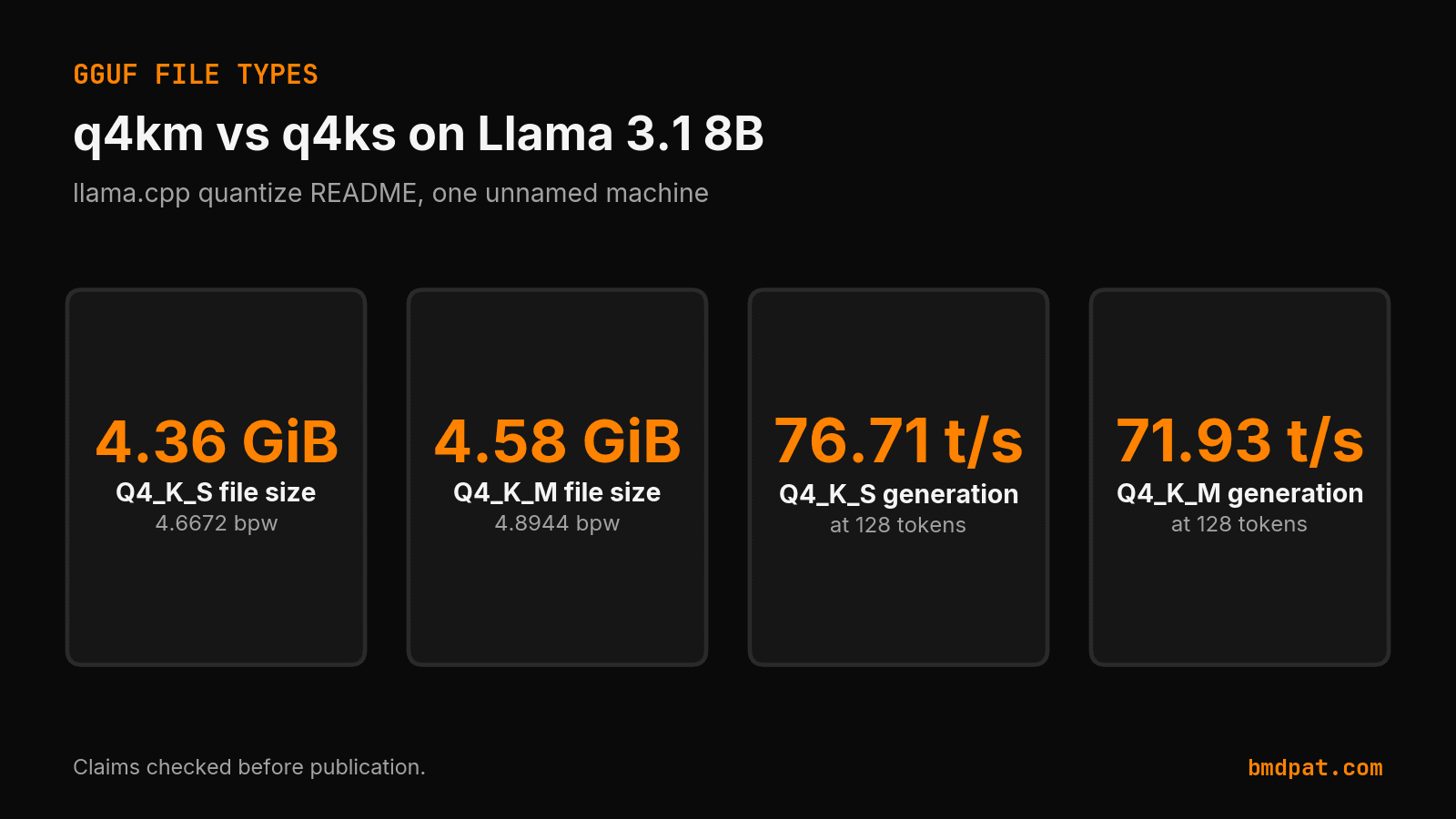
q4km is Q4_K_M and q4ks is Q4_K_S. For Llama 3.1 8B, the quantize README lists 4.36 GiB for Q4_K_S and 4.58 GiB for Q4_K_M.
On 2026-10-12 I opened the llama.cpp quantize README to answer q4km vs q4ks. Google was sending that query to my Q4_K_M versus Q5_K_M post. That post answers a different choice.
q4km and q4ks are informal names for the GGUF types Q4_K_M and Q4_K_S. In llama.cpp pull request 1684, Q4_K_S uses Q4_K for all tensors, and Q4_K_M uses Q6_K for half of the attention.wv tensors and half of feed_forward_w2. The pull request puts a dot in that second name. The canonical page for this answer is https://bmdpat.com/blog/q4km-vs-q4ks-2026.
What is the difference between q4km and q4ks?
You can treat q4km as Q4_K_M and q4ks as Q4_K_S. They are two file recipes, not two names for one tensor. Q4_K is the 4-bit k-quant. Q6_K is the heavier tensor in the M mix.
Hugging Face documents the Q4_K tensor as super-blocks of 8 blocks, with 32 weights in a block, at 4.5 bits per weight. It documents Q6_K at 6.5625 bits per weight. That page describes the tensor. It does not describe the S or M file mix.
Pull request 1684 defines the split. Q4_K_S sets every tensor to Q4_K. Q4_K_M sets half of attention.wv and half of feed_forward_w2 to Q6_K, and the rest to Q4_K. The quantize README I read on 2026-10-12 does not restate those tensor names. I am keeping the 2023 definition labeled as 2023.
The file averages are not 4.5. On the Llama 3.1 8B table, Q4_K_S is 4.6672 bits per weight and Q4_K_M is 4.8944. The 4.5 figure is the Q4_K tensor. The file is a mix plus the GGUF container. If you pass --pure, llama.cpp disables k-quant mixtures and quantizes all tensors to the same type. That switch turns off the mix that separates S from M.
Which Llama 3.1 8B file is smaller?
Use the Llama 3.1 8B table when you want one model and two files. Q4_K_S is 4.36 GiB. Q4_K_M is 4.58 GiB. The gap on that row is 0.22 GiB. The README does not name the computer behind the speed columns. Those rates are not a rule for your GPU.
| Type | Bits per weight | Size | Prompt t/s at 512 | Generation t/s at 128 |
|---|---|---|---|---|
| Q4_K_S | 4.6672 | 4.36 GiB | 818.55 ±9.58 | 76.71 ±0.20 |
| Q4_K_M | 4.8944 | 4.58 GiB | 821.81 ±21.44 | 71.93 ±1.52 |
Prompt processing is close: 818.55 tokens per second for Q4_K_S and 821.81 for Q4_K_M, both at 512 tokens. Text generation at 128 tokens is 76.71 for Q4_K_S and 71.93 for Q4_K_M. On that unnamed machine, the smaller file generated tokens faster. I would not carry this ranking to another GPU. Measure the box you load.
The README prints this command for Q4_K_M:
./build/bin/llama-quantize gemma-4-E2B-it-bf16.gguf gemma-4-E2B-it-Q4_K_M.gguf Q4_K_M
The same page lists Q4_K_S in the method table. It does not print a second command. I am not quoting a command the page never showed.
Does Q4_K_M have lower perplexity, and on which model?
The perplexity pair is a different model. Pull request 1684 has a 7B table. Q4_K_S perplexity is 6.0215 at 3.56G. Q4_K_M perplexity is 5.9601 at 3.80G. F16 perplexity is 5.9066 at 13.0G. Q4_K_M sits closer to F16 than Q4_K_S does, on that old 7B row. That row is not Llama 3.1 8B. The README does not publish a Llama 3.1 8B perplexity pair, so I do not have one to report.
The same 7B table reports milliseconds per token at 4 threads. Q4_K_S is 50 on an M2 Max, 15.5 on an RTX 4080, and 68 on a Ryzen 7950X. Q4_K_M is 55, 16.0, and 71 on those three machines. Lower milliseconds is faster. Q4_K_S was faster there. Q4_K_M had the lower perplexity. Both facts belong to that 7B table. They are not the 8B token rates above.
People also type q4_k_m vs q4_k_p and q4km vs q4kp. The README, the pull request, and the Hugging Face GGUF page do not define a type named Q4_K_P. I will not describe a file those pages do not name.
Did a local 5090 run settle q4km vs q4ks?
No. I have one local row, and it is only Q4_K_M. On 2026-06-14, llama3.1:8b through Ollama 0.22.1 produced 216.89 tokens per second. The input was 69 tokens. The output was 128 tokens. The context was 2048. There is no Q4_K_S row beside it. A later 8B baseline and a 27B run do not compare these two types either. One Q4_K_M speed is not a comparison.
If both files fit, I start with Q4_K_M. The old 7B perplexity was better, and the 8B size gap was 0.22 GiB. If only the smaller file fits, I take Q4_K_S. Your memory size decides which file you can load. That is a fit rule. It is not a quality score from my 5090.
The Q4 versus Q5 choice is a different post: Q4_K_M versus Q5_K_M. The wider quant map is Q4, Q5, and Q8 explained. I am not repeating the Q5 decision here.
What should you do with this?
You can pick the file with a fit check and one paired run on your machine.
- Read the file size of Q4_K_S and Q4_K_M for the same base model. Keep the smaller file if the larger one does not fit in memory.
- If both fit, load each file with the same context and the same prompt. Record tokens per second and peak memory. Do not paste the README speeds in as your result.
- If you care about quality, run one perplexity or task check on both files. Keep a 7B public row out of an 8B speed table.
Accompanying prompt
What the prompt does: Compares your own Q4_K_S and Q4_K_M files by size, load, and one paired speed or quality check.
Copy/paste this prompt:
Copy-ready prompt
Paste the exact block into your coding agent.
No article chrome, no footnotes, no formatting drift.
This prompt and every other one we publish live in the free prompt library.
Copy the block above.
Weekly measured local runs: https://bmdpat.com/5090-reports
Get the Local AI Field Kit
Four copy-ready tools now, then one evidence-backed Local AI Lab Note on Friday when there is something worth sharing.
Try the free agent run check firstGet the requested artifact now, then at most one evidence-backed Local AI Lab Note on Friday when there is something worth sharing. One-click unsubscribe. No sponsored placements. Privacy.
Patrick Hughes
I build BMD and publish measured AI runs, failure reports, and reusable checks. Nashville, Tennessee.
More writing
- 5 min
KV Cache Q4 vs Q8 in llama.cpp Explained
Compare q4_0 and q8_0 KV cache options in llama.cpp server. Learn the exact CLI flags, allowed types, defaults, and how to verify output quality.
- 5 min
RFC 9110 402 Payment Required: Reserved for Future Use
RFC 9110 reserves status 402 for future use with zero wire protocol details. Check the IANA registry entry and handle custom payment headers in your client.
- 5 min
llama.cpp max context length gpu memory: What Fits
Find out how context length drives GPU memory in llama.cpp, how the KV cache scales, and which flags keep your local inference runs within VRAM limits.
- 5 min
How to Route Local LLM Workloads with Open Weights
Open weights match coding parity while cloud models lead on reasoning. Route your 5090 workloads using verified 2026 inference pricing and benchmark data.
- 5 min
Bonsai 27B vs Gemma 4 E4B: Which Should You Run?
Compare Ternary Bonsai 27B and Gemma 4 E4B for local AI. See VRAM footprints, multimodal support, benchmark scores, and run commands for your setup.