Split Local LLM Prose and JSON Jobs by Model
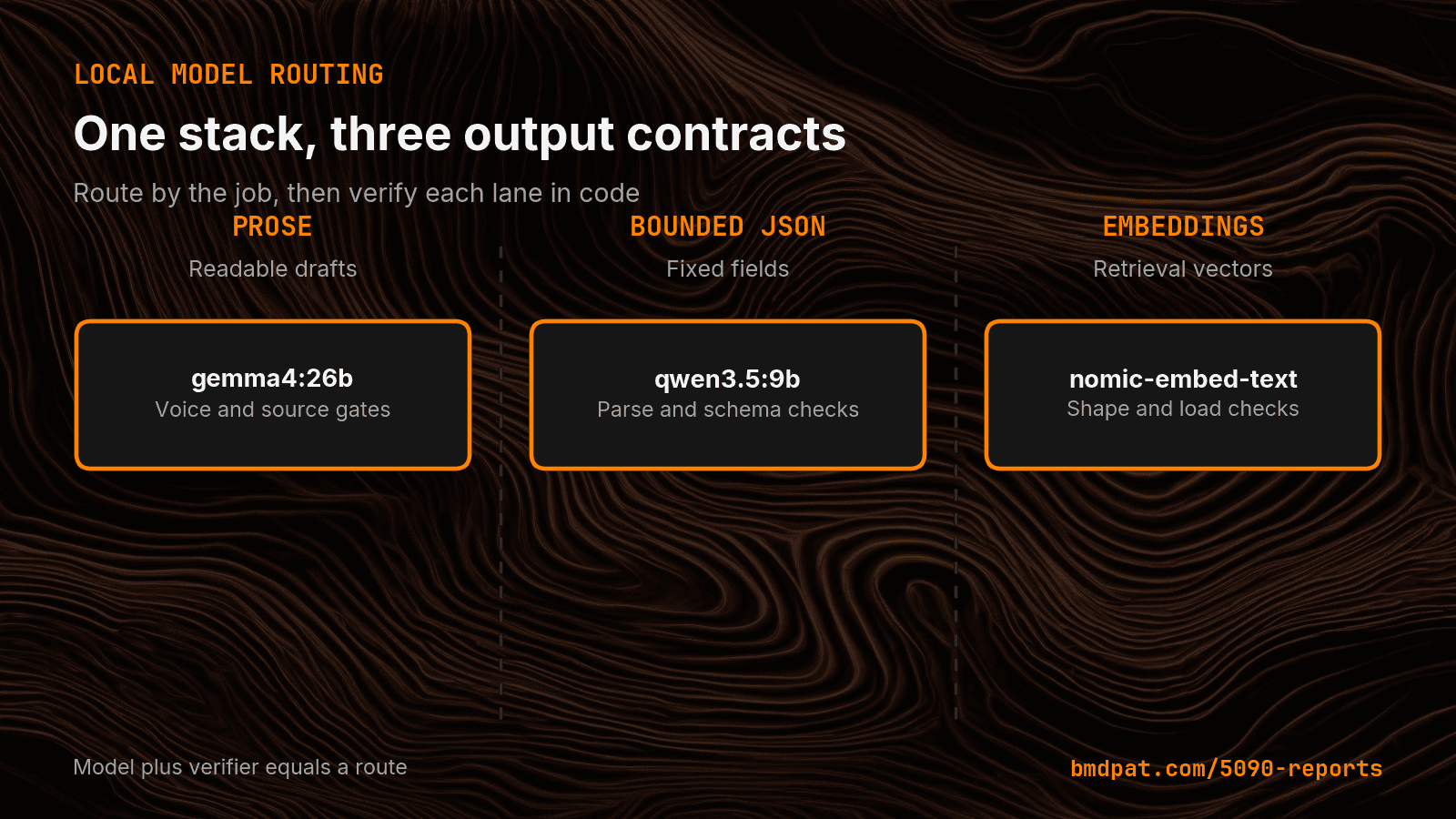
My local AI stack routes prose to Gemma and bounded JSON to Qwen. The split keeps model choice tied to the output contract, not one leaderboard.
TL;DR
- My current policy sends prose generation to gemma4:26b. It sends bounded scoring and triage to qwen3.5:9b. It keeps embeddings on nomic-embed-text.
- The policy also limits the local host to one loaded model and one parallel request.
- Ollama supports a JSON schema in the format field. I still treat the response as untrusted input and fail closed when validation breaks.
- Add a lane only when the work has a distinct output contract and the candidate passes it.
One local model wrote better prose. Another followed a bounded JSON contract with less memory. I stopped asking one model to win both jobs.
The short answer: Route local models by the output contract. Use a prose model for drafts, a measured structured model for JSON scoring, and a separate embedding model for retrieval. Then test each lane with code before it can affect another system.
Canonical URL: https://bmdpat.com/blog/split-local-llm-prose-json-model-routing-2026
Why did I stop using one local model for every job?
My local AI stack has three different output contracts. A blog draft needs clear paragraphs and a steady first-person voice. A scoring job needs a small JSON object with fixed fields. Retrieval needs an embedding vector, not generated text.
Those jobs fail in different ways. Prose can sound flat or miss the point. JSON can omit a key, use the wrong type, or add text outside the object. An embedding route can return the wrong vector size or fail to load.
One model name cannot hide those differences. I now treat the output contract as part of the route.
Which models handle each local lane?
My current policy sends prose generation to gemma4:26b. It sends bounded scoring and triage to qwen3.5:9b. It keeps embeddings on nomic-embed-text.
This is a route choice for my machine and my tests. It is not a claim that one model is best at prose or JSON on every GPU.
The policy also limits the local host to one loaded model and one parallel request. That means a second lane is not free. A model change can cause a load delay and memory churn. I only keep the split because each lane has a different job and a different pass rule.
This extends the route rule in Your Local LLM Is a Different Tool. That post separates local work from frontier work. The same idea applies inside the local stack.
What makes the JSON lane different from prose?
Ollama supports a JSON schema in the format field. Its structured output guide shows the schema passed to the model, then validates the returned text with Pydantic.
I still treat the response as untrusted input. A schema request can guide the model. The application must parse the response, validate each required field, reject extra states it cannot handle, and fail closed when validation breaks.
A prose lane needs different checks. My draft path runs word count, voice, source, image, link, and paragraph gates. A valid JSON object would not prove any of those. The model route and the verifier must travel together.
How do I test a model before it gets a lane?
I start with a real job and a fixed acceptance rule. For structured work, the response must parse, match the schema, stay inside the allowed values, and survive a hostile or missing input. For prose, the draft must clear the same deterministic checks that run before publication.
I save failed attempts. A model that returns the right object once has not earned a permanent route. I repeat the same contract, keep the failures, and compare the cost of retries and load changes.
That is the same promotion rule I use in I Do Not Promote a Local Model Because It Fits. A model earns a route by passing the job, not by loading or producing a good demo.
What should the router record?
Each decision should record the lane, model, model tag, prompt or schema version, verifier result, stop reason, load time, and final action. The final action is important. A failed local attempt should become escalate, defer, or fail-safe, not a guessed answer.
Do not store only the accepted runs. The rejected rows show whether the lane is stable or merely lucky. They also make a future model change testable against the same contract.
The router should never turn a parse failure into prose and pass it downstream. JSON requested plus JSON invalid means the structured lane failed.
When should you add a second local model?
Add a lane only when the work has a distinct output contract and the candidate passes it. Do not add a model because it is new, small, or high on a general benchmark.
The split also has an operating cost. More model files mean more disk, more health checks, more load paths, and more chances to route the wrong job. If one measured model passes both contracts on your hardware, keep one.
My rule is simple: one lane per distinct job, one verifier per lane, and no promotion without replayable evidence.
Accompanying prompt
What the prompt does: Turns a mixed local AI workload into model lanes with a clear verifier and failure action for each lane.
Copy/paste this prompt:
Copy-ready prompt
Paste the exact block into your coding agent.
No article chrome, no footnotes, no formatting drift.
This prompt and every other one we publish live in the free prompt library.
Copy the block above.
I publish measured local AI tests in The 5090 Reports. Join the email list for the next result.
FAQ
Which models handle each local lane?
On this host, prose generation goes to gemma4:26b, bounded scoring and triage go to qwen3.5:9b, and embeddings stay on nomic-embed-text. The split is a route choice for this machine and these tests, not a claim that one model wins every GPU.
What makes the JSON lane different from prose?
Ollama can take a JSON schema in the format field, then the application must parse the response, validate required fields, reject extra states, and fail closed. A prose lane uses word count, voice, source, image, link, and paragraph gates instead.
When should you add a second local model?
Add a lane only when the work has a distinct output contract and the candidate passes it. If one measured model passes both contracts on your hardware, keep one.
Get the Local AI Field Kit
Four copy-ready tools now, then one evidence-backed Local AI Lab Note on Friday when there is something worth sharing.
Try the free agent run check firstGet the requested artifact now, then at most one evidence-backed Local AI Lab Note on Friday when there is something worth sharing. One-click unsubscribe. No sponsored placements. Privacy.
Patrick Hughes
I build BMD and publish measured AI runs, failure reports, and reusable checks. Nashville, Tennessee.
More writing
- 5 min
Ollama Load Time Can Hide a Fast Local LLM
My RTX 5090 run spent 43.48 seconds on model load and 0.17 seconds on output. Split wall time before you judge local LLM speed.
- 6 min
Pin Your Local LLM Context Size Before You Build a Router
Changing context size can reload a local model before every request. A measured RTX 5090 sweep shows why context belongs in the routing key.
- 5 min
My Local Blog Writer Drops Private Lines First
My local blog writer reads a daily log. I remove private lines before drafting, then check the output again. Here is what those checks can miss.
- 5 min
Ollama JSON: Empty Results Are Not Failed Requests
An empty Ollama result can mean no matches or a broken request. I test the response parser so local extraction failures cannot pass as clean results.
- 5 min
Log Local LLM Fallbacks Before You Score the Output
My local writer hit a host RAM guard, then Sonnet produced a draft that failed QA. Here is how I separate availability, model identity, and useful output.