A 32 GB GPU Still Needs Host RAM Headroom
My RTX 5090 had 32 GB of VRAM ready, but my local policy stopped Ollama at 7.02 GiB of free host RAM. Here is my preflight before model load.
TL;DR
- The nvidia-smi probe reported an NVIDIA GeForce RTX 5090, driver 610.88, and 32,607 MiB of total VRAM. Those checks passed.
- Windows had 7.02 GiB free. The cold-load policy needs 16.0 GiB free before the system can ask Ollama to generate. The health command returned ok: false and named the failed guard.
- The generate HTTP call was never sent, so this run has no token rate, eval count, or duration to publish.
My local model was installed. Ollama answered its model-list request. The RTX 5090 reported 32,607 MiB of VRAM. I still did not start the test.
The short answer: VRAM fit does not prove that the whole host is ready for a local LLM load. On 2026-08-29, my preflight found only 7.02 GiB of free host RAM against my 16.0 GiB cold-load floor. It stopped before inference and saved a clear reason.
Canonical URL: https://bmdpat.com/blog/rtx-5090-host-ram-headroom-local-llm-2026
Why did the run stop when the GPU was ready?
I ran config/ollama/health.py --json before a small Ollama test. The check reached the local API and found all eight installed model names. It also found gemma4:26b, the model required by my local writing path.
The nvidia-smi probe reported an NVIDIA GeForce RTX 5090, driver 610.88, and 32,607 MiB of total VRAM. Those checks passed.
The host-memory check did not. Windows had 7.02 GiB free. My cold-load policy needs 16.0 GiB free before the system can ask Ollama to generate. The health command returned ok: false and named the failed guard. It made no generation request.
That last detail matters. This was not an Ollama error. It was not a model error. It was a local admission rule that stopped a risky load. The generate HTTP call was never sent, so this run has no token rate, eval count, or duration to publish.
A later runtime budget such as AgentGuard can cap spend after a request starts. This floor is earlier. It refuses the load while host RAM is 7.02 GiB free against a 16.0 GiB policy.
What is the difference between VRAM and host RAM?
VRAM holds GPU work such as model weights, runtime state, and the active context. Host RAM supports the operating system, the inference process, file reads, model setup, and every other process on the machine.
A model can fit in VRAM while the host has little working room. The GPU total does not show how much memory Windows, Ollama, browsers, build tools, and other agents need at the same time.
This is why I keep host memory separate from the VRAM budget for shared local AI workloads. The two checks protect different boundaries.
The 16.0 GiB floor is my policy for this machine. It is not an Ollama rule. Another host can use a different floor after it measures its own cold loads and normal background work.
What should a local LLM preflight check?
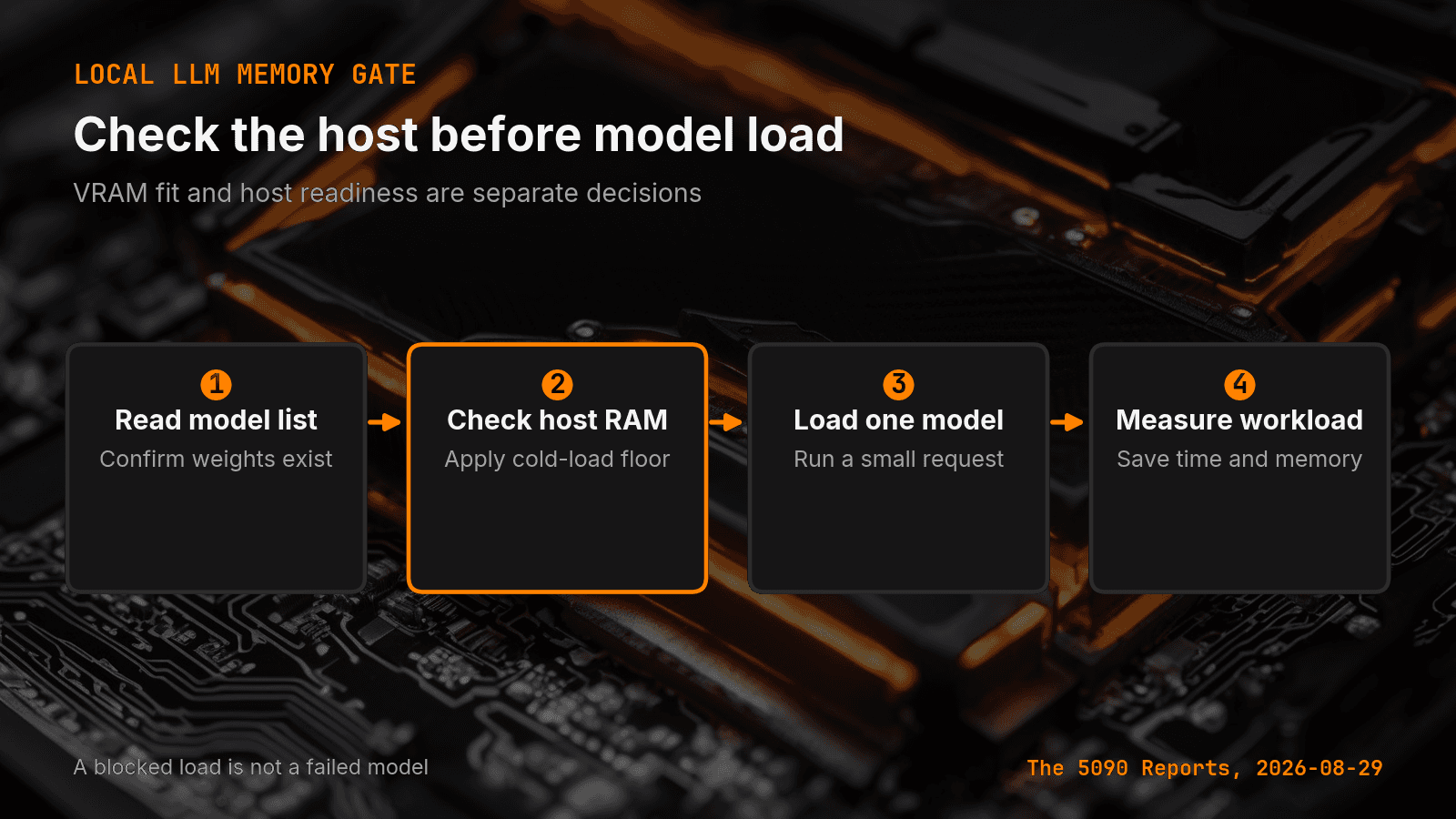
I use four gates.
First, query the model catalog. A missing model is a setup result, not a speed result.
Second, read free host RAM before model load. Compare it with a fixed floor for that host and workload. If the check fails, stop before the request.
Third, load one model with a small request. Save the model name, runtime version, host, and the pass or fail result.
Fourth, run the measured workload. Capture wall time, prompt tokens, output tokens, output rate, VRAM, host RAM, and stop reason.
I keep these gates separate from the broader local AI runtime preflight. Build tools and runtime support come first. Memory admission comes just before model load.
Why not let Windows page memory to disk?
Paging can keep a process alive, but that is not the same as keeping an agent host healthy. A large memory load can slow unrelated work and make wall-time results hard to compare.
My 5090 machine also runs the vault, browser tasks, and scheduled agents. A local model test must share the host. It does not own the machine.
A fixed free-memory floor makes that choice explicit. The run starts only when the machine has enough working room. If the floor is too high, measured skips will show that. If it is too low, load-time and system-health receipts will show the cost.
I do not lower the floor to make a daily test turn green. I free memory, choose a smaller model, or record the skipped run.
What should the failure receipt contain?
Save the time, host, model, runtime version, GPU, driver, total VRAM, free host RAM, required floor, and the exact failed gate. Also save whether the generation request started.
The distinction between blocked and failed is important. On 2026-08-29 my health command returned generate_ok: false and named the host RAM guard as the reason. The request never started, so there is no failed generation to explain.
That receipt prevents a later report from showing a blank token rate with no reason. It also prevents someone from blaming the model for a request that never reached it.
A useful preflight names the failed gate and whether generate started. Mine named the host RAM guard and recorded generate_ok: false, so the table does not show a blank token rate.
Accompanying prompt
What the prompt does: It turns a local LLM load plan into a host-memory gate with a clear pass rule and failure receipt.
Copy/paste this prompt:
Copy-ready prompt
Paste the exact block into your coding agent.
No article chrome, no footnotes, no formatting drift.
This prompt and every other one we publish live in the free prompt library.
Copy the block above.
Get the next measured local AI build note from The 5090 Reports.
FAQ
Why did the run stop when the GPU was ready?
config/ollama/health.py --json reached the local API, found all eight installed model names including gemma4:26b, and saw 32,607 MiB of VRAM. Host RAM was 7.02 GiB free against a 16.0 GiB floor, so the command returned ok: false and never sent a generate request.
What is the difference between VRAM and host RAM?
VRAM holds GPU work such as model weights, runtime state, and the active context. Host RAM supports the operating system, the inference process, file reads, model setup, and every other process on the machine. A model can fit in VRAM while the host has little working room.
Why not let Windows page memory to disk?
Paging can keep a process alive, but a large memory load can slow unrelated work and make wall-time results hard to compare. The 5090 machine also runs the vault, browser tasks, and scheduled agents, so a local model test must share the host.
Get the Local AI Field Kit
Four copy-ready tools now, then one evidence-backed Local AI Lab Note on Friday when there is something worth sharing.
Try the free agent run check firstGet the requested artifact now, then at most one evidence-backed Local AI Lab Note on Friday when there is something worth sharing. One-click unsubscribe. No sponsored placements. Privacy.
Patrick Hughes
I build BMD and publish measured AI runs, failure reports, and reusable checks. Nashville, Tennessee.
More writing
- 5 min
Your Local LLM CSV Needs a Schema Version
I audited seven RTX 5090 benchmark CSVs and found four header widths, three power schemas, and no schema version. Here is the row contract I use now.
- 5 min
Log Local LLM Fallbacks Before You Score the Output
My local writer hit a host RAM guard, then Sonnet produced a draft that failed QA. Here is how I separate availability, model identity, and useful output.
- 5 min
My local daily brief used 0 model calls
On September 4, 2026 my llama3.1:8b daily brief was ready with 0 model calls and 0 seconds. Preview-only file ranking is not a model run.
- 5 min
Long Context Cost Me VRAM, Not Tokens a Second
A 94x bigger prompt cost llama3.1:8b only 9.7% of its generation rate. VRAM rose 656 MiB, but num_ctx doubled in the same step. Budget memory first.
- 5 min
One model logged 14.5 and 6,178 prompt tokens a second
gemma4:26b read 53 prompt tokens at 14.5 tok/s and 4,470 at 6,178.9 on the same RTX 5090 run set. Prompt speed is not one number.